Docs → Game Tools → Getting your battles into the portal
📜 Getting your battles into the portal
The two ways your battle journals reach the portal, through your clan's chat group or through your own game account with tokens, how to set each one up, and how long a battle takes to arrive.
Every battle you fight leaves a battle report in your journal in the game. That report records every strike: which troops you sent, which captains and artifacts rode with you, how often you struck twice or did double damage, and how much damage each stack did. Once the portal holds your reports, it can work out your real bonuses instead of the ones you remember, and that changes a lot:
- The Stacking Calculator fills in your bonuses, battle extras, Temple level and captains with one button, turns damage into epic points, limits Strongest mix to what you have sent before, and checks afterwards whether a battle went as calculated.
- Your troop levels, captains and artifacts in the portal are kept up to date from the battles you fight. A level is only ever raised, never lowered.
There are two ways to get your battles in. You can use either, or both at once.
| Way 1 · Your clan's chat group | Way 2 · Your own game account | |
|---|---|---|
| Who sets it up | Your clan's leadership, once for the whole clan. | You, for your own players. |
| What you do for each battle | Share the battle report in the clan's chat group in the game. | Nothing. The portal reads your journal by itself. |
| Cost | Nothing extra. It runs on your clan's subscription. | Tokens, for the game logins that keep the portal's access to your journal fresh. There is also a free way, see below. |
| How fast | Usually within the hour. | Every night, and whenever you open the Stacking Calculator. |
| Which battles | Only the ones someone shares. | All your battles of the last 30 days. |
| Without a clan | Not possible. | Works. |
If the same battle arrives both ways, the portal keeps one copy. The screenshots in this article come from a demo clan with made-up names.
Way 1 · Share your battles in your clan's chat group
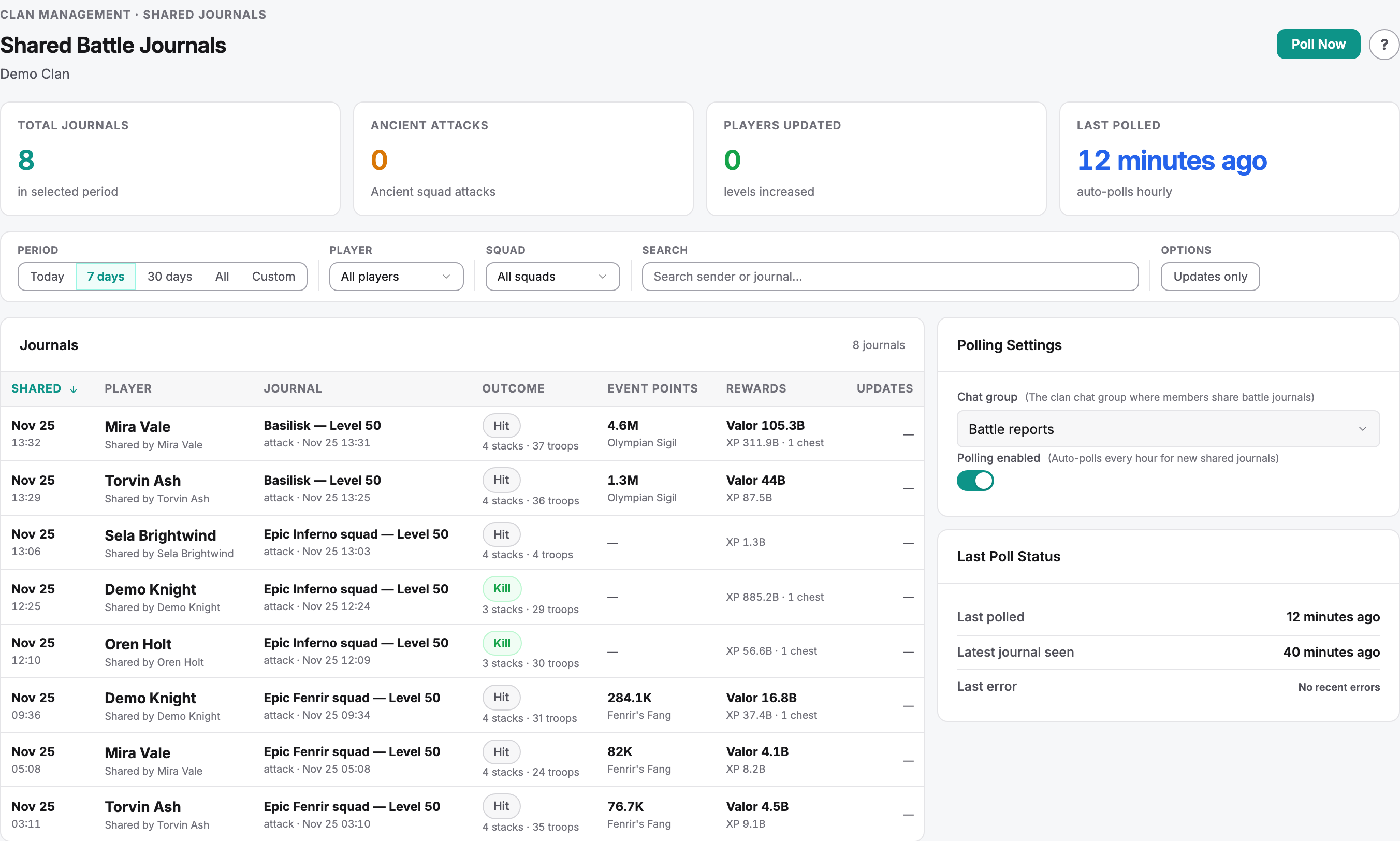
Your clan picks one in-game chat group where members post their battle reports. Every hour the portal reads the reports shared there and stores each battle under the clan member who fought it. Setting it up takes a leader a few minutes; after that, all a member has to do is share.
For leaders: set it up once
Your clan needs its chest grabber account, which comes with the clan's subscription: it is the account that reads the chat group. Then:
Use a group your members can post in, ideally one just for battle reports, so the reports are not buried among chat. Create it with + New group and link it with 🔗 Link to game. Only a group that is linked to the game can be chosen in the next step. How groups work is explained in In-game chat groups.
In Polling Settings on the right, pick the group under Chat group, then switch on Polling enabled. Choose the group first: the card reminds you if you have not.
Ask them to share their battle reports in that group, the epic battles above all. The next section is what they need to know.
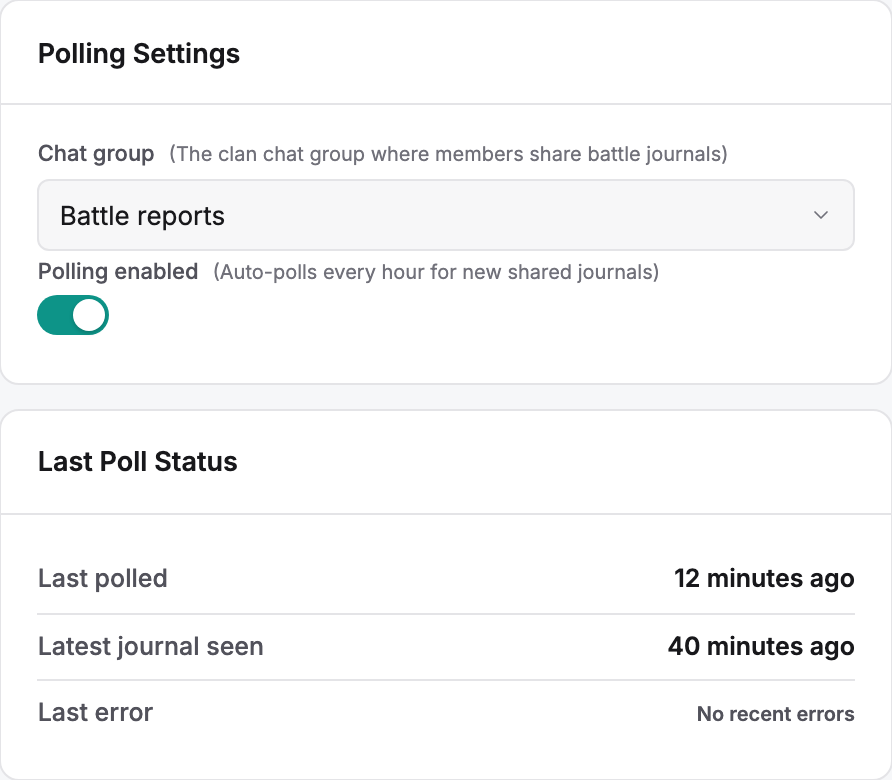
- Who may change it. Only people your clan allows to set up journal reading can change these settings. By default that is the owner and the admins. You can hand it to others in Clan Permissions, and the same goes for read shared journals now, the right to press Poll Now.
- How often. The portal reads the group every hour. Poll Now at the top of the page reads it straight away, for when someone has just shared a battle and wants to use it.
- When something goes wrong. Last Poll Status shows when the group was last read, the latest journal seen, and the last error. Most errors pass by themselves at the next reading. If the group cannot be found in the game, link it again on In-game Chat Groups.
For members: share every battle you want to use
The report lands in your journal in the game as usual.
In the game, open the battle report from your journal and share it to the chat group your clan reads. Ask your leadership which group that is if you are not sure.
Within the hour the battle is on Shared Battle Journals and in the Stacking Calculator. Someone with the right can press Poll Now to fetch it at once.
- The battle counts for whoever fought it, not whoever shared it. A clanmate can share your report for you, and it is still stored under your player.
- You have to be in the clan. A battle by someone who is not a current member stays on the page marked No player match, but it is not stored under anyone and nothing is updated from it.
- Your player must be linked to your portal account for the calculator to show the battle to you. See Linking your players.
- Battles fought together with other players (raids) are stored, but the calculator cannot read your own bonuses from them, because other players' strikes are in them too.
Way 2 · Let the portal read your own journal
With a game account, the portal reads your journal itself. You never have to share anything, every battle of the last 30 days arrives, and it works even if you are not in a clan. It takes three things: the game account, access to each player's journal, and, to keep that access fresh without thinking about it, tokens.
Step 1 · Add your game account
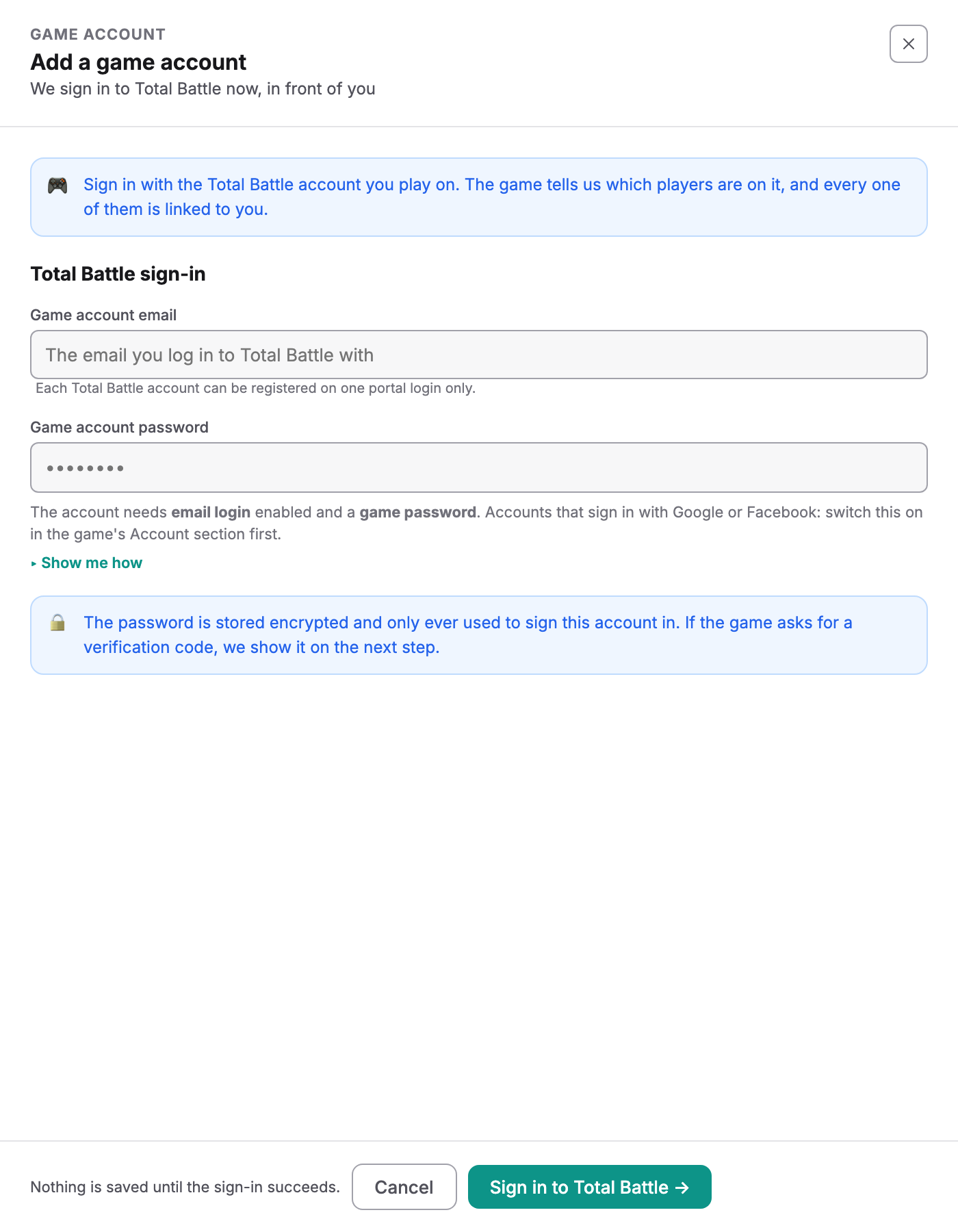
On the 🎮 Game accounts card, press + Add game account.
The account needs email login switched on and a game password. If you sign in to the game with Google or Facebook, switch on email login in the game's Account section first; Show me how in the panel walks you through it. Each Total Battle account can be registered on one portal login only.
The portal signs in now, in front of you. If the game asks for a verification code, the next step shows where to type it. Nothing is saved until the sign-in succeeds. The password is stored encrypted and is only ever used to sign this account in.
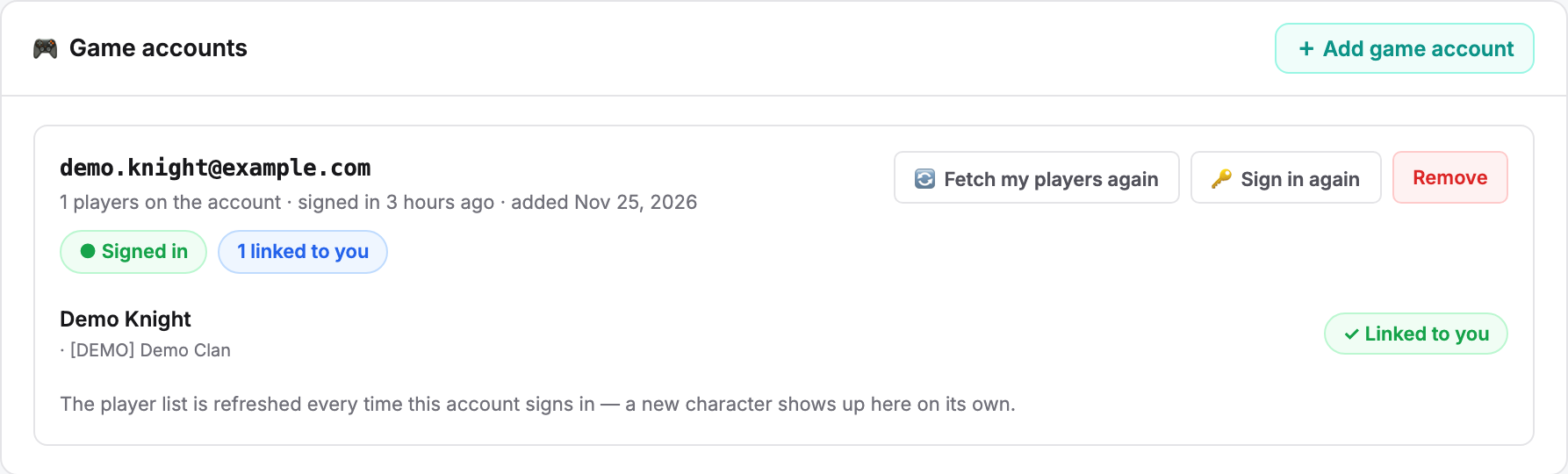
The card lists every player on the account, and each one is linked to your portal login. The list is read again every time the portal signs in to the account, so a new character shows up on its own. The buttons:
- Fetch my players again asks for a sign-in that only reads the player list. It is free. It also matters for your journal, see the next step.
- Sign in again is for when you changed the game password, or the account stopped working.
- Enter the code appears when the game wants a verification code, and Resume automation when the account stopped on an error you have sorted out. While an account waits for a code or is in error, the portal does not sign in to it at all.
- Remove takes the account off the portal.
Step 2 · Give the portal access to each player's journal
Adding the account is not quite enough. To read a player's journal, the portal needs that player's journal access, which the game only hands over while the portal is signed in as that player. It picks it up in one of two ways:
| How | Cost | What it does |
|---|---|---|
| Automation runs | Tokens | Every time the portal signs in to set your shield or collect your chests, it renews the journal access of each player it handles. Tick a player for 🛡 Shield or 📦 Chests, and their journal access stays fresh on its own. |
| Fetch my players again | Free | One sign-in that reads the player list and picks up journal access for up to six players that have none, or whose access is about to run out. No shield, no chests. |
Journal access lasts about five weeks. With automation it is renewed long before then. Without automation, press Fetch my players again when you add the account, and again whenever your battles stop arriving.
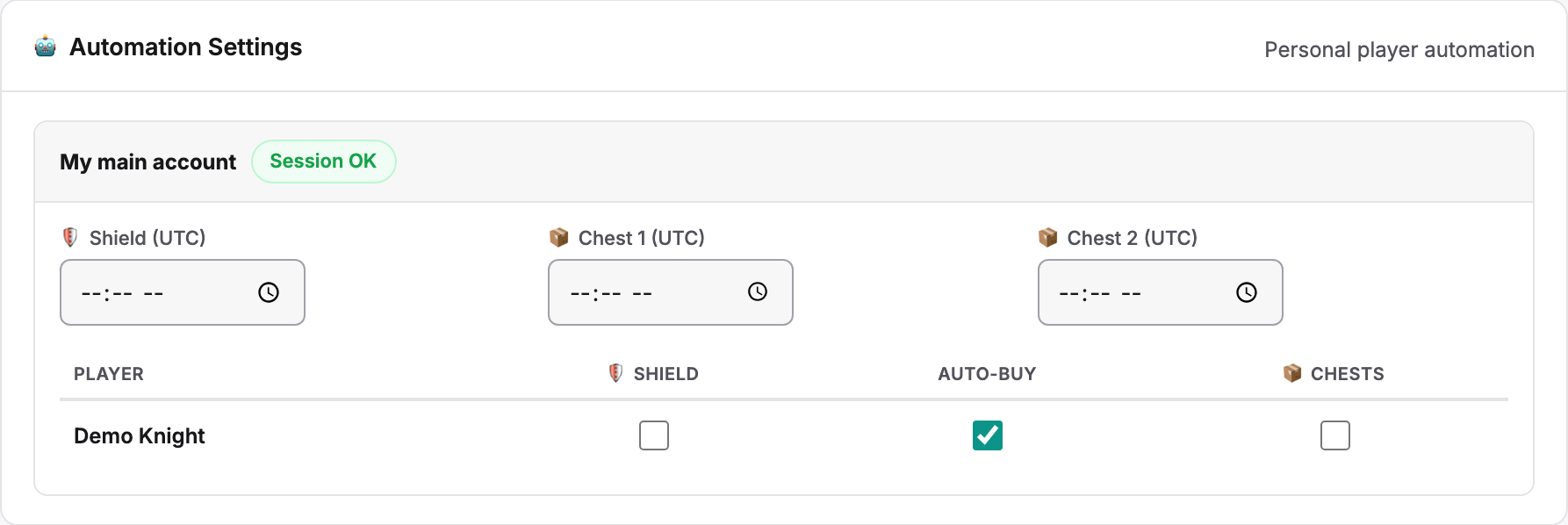
In 🤖 Automation Settings each game account has three times in UTC: 🛡 Shield (UTC), 📦 Chest 1 (UTC) and 📦 Chest 2 (UTC). Under them, tick 🛡 Shield, Auto-Buy and 📦 Chests for each player. A player with Shield or Chests ticked is signed in to on schedule, and that sign-in keeps their journal access fresh. More about these settings is in User & player settings.
Step 3 · Buy tokens
Tokens pay for the game logins the portal makes for you. They are personal: they have nothing to do with your clan's subscription, and your clan's chest scanning never uses them.
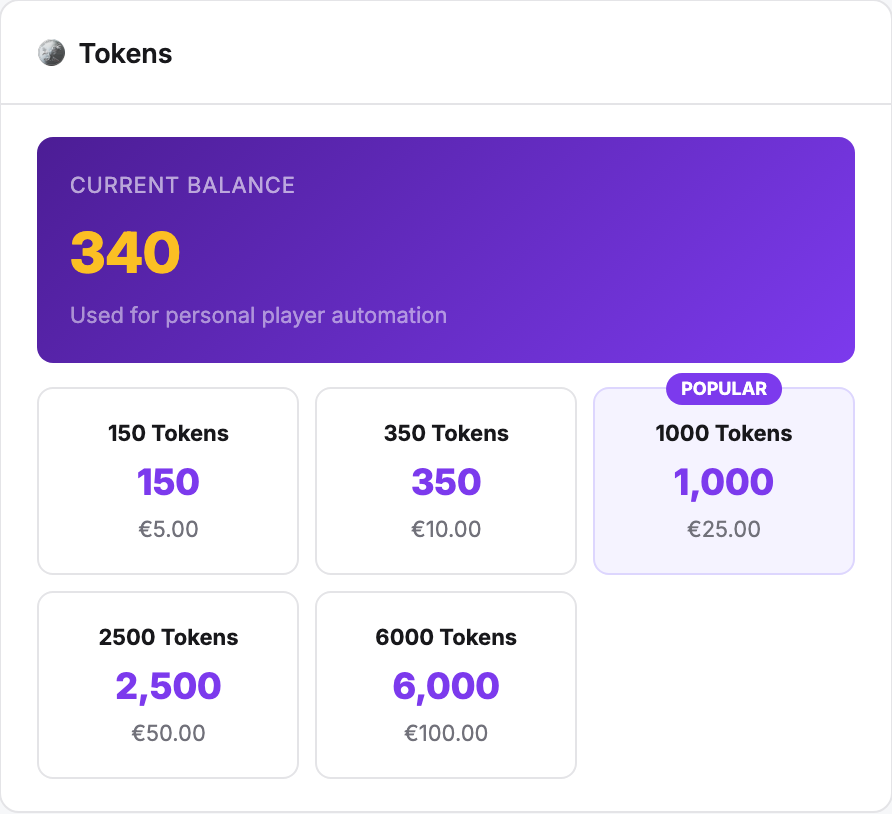
| Package | Price |
|---|---|
| 150 tokens | €5 |
| 350 tokens | €10 |
| 1,000 tokens | €25 |
| 2,500 tokens | €50 |
| 6,000 tokens | €100 |
Pick a package and you are taken to a secure payment page. The purchase needs an email address on your portal account; if it has none, the portal asks for one first. The tokens are added to your balance once the payment goes through, and 📜 Token History lists every purchase and every token spent.
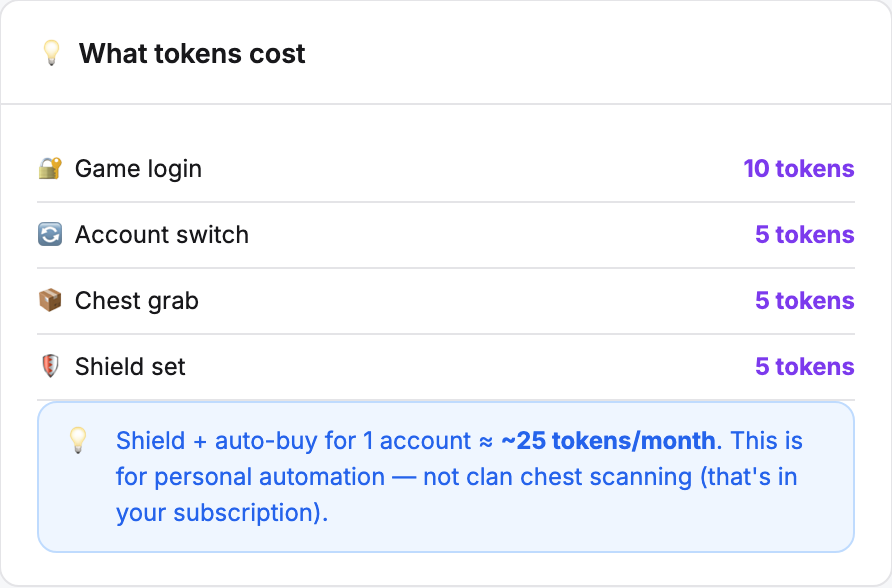
A sign-in costs a Game login, and every further player on the same account costs an Account switch. Each Chest grab and Shield set is paid on top. The card shows the current prices and an estimate for a month of shield with auto-buy. If your balance cannot pay for a run, the portal skips it until you top up, and then your journal access is not renewed either.
After that: what happens by itself
- Every hour the portal reads the list of entries in your journal.
- Every night it fetches the details of up to 100 of your new battles per player.
- When you open the Stacking Calculator, it fetches up to 30 more per player. They arrive a little later, so if a battle you just fought is not there yet, reload the page after a minute or two.
- Only the last 30 days are read. Older battles are not fetched.
Battles read from your own journal are yours alone. They are not shown on Shared Battle Journals or on any other clan page. If someone also shares the same battle in your clan's group, the clan's copy takes the place of yours, so the battle is never counted twice.
Where your battles show up
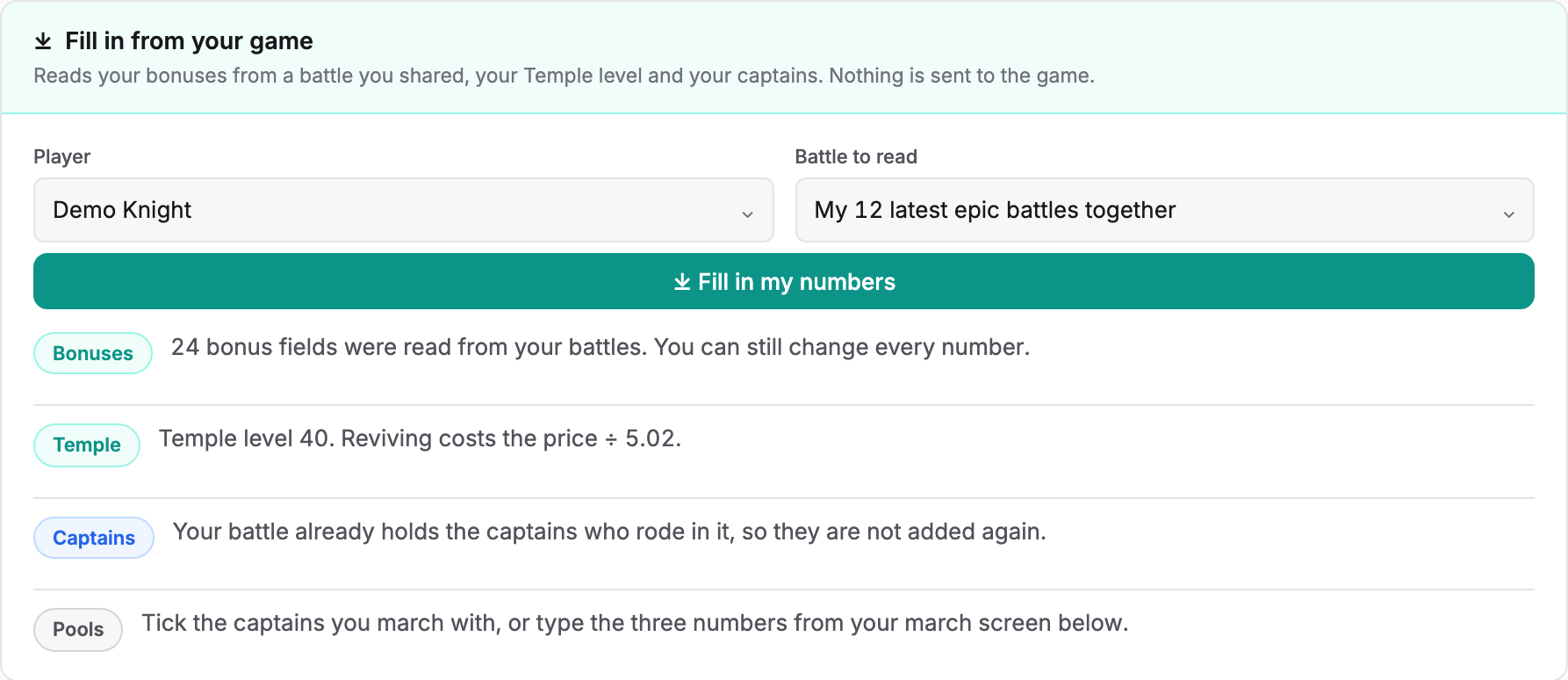
- Stacking Calculator, step 2: Fill in my numbers reads your bonuses, battle extras and captains from your latest epic battles, or from one you pick.
- Stacking Calculator, figures at the top: Epic points uses the points rate measured from battles against the same epic.
- Stacking Calculator, step 4: Strongest mix with What I’ve sent before limits each unit to the most you sent in one battle in the last 30 days.
- Stacking Calculator, step 5: the battles you can check a saved calculation against.
- Shared Battle Journals: every battle shared in your clan's group. Battles read from your own journal are not listed here.

When a battle does not show up
- Wait for the next reading. A shared battle arrives within the hour, and a battle from your own journal arrives at night or when you open the calculator.
- Check that it was shared in the right group. Only the group chosen on Shared Battle Journals is read. Ask your leadership which one it is.
- Check that polling is on. Polling enabled must be switched on, and Last Poll Status shows if the last reading failed.
- Check the player. The battle is stored under the clan member who fought it, and the calculator shows it only for players linked to your portal account.
- Check your game account. On the Game accounts card it should say Signed in. An account that waits for a code or is in error is not signed in to, so nothing new is read.
- Renew the journal access. If your own battles stopped arriving after a few weeks without automation, press Fetch my players again.
- Check the date. Battles older than 30 days are not read from your own journal.
Common questions
Which way should I use?
If your clan already reads a chat group, Way 1 costs you nothing: share your epic battles there and they arrive within the hour. Way 2 suits you if you want every battle without sharing anything, if your clan does not read a group, or if you are not in a clan. Many players use both; the portal never counts the same battle twice.
Do I have to buy tokens to use my own journal?
Not strictly. The free Fetch my players again button on the Game accounts card gives the portal journal access for up to six players, and that access lasts about five weeks. Tokens are what keep it fresh without you thinking about it: every automation run that sets a shield or collects chests also renews the journal access of the players it handles.
Can my clan see the battles from my own journal?
No. Battles read from your own journal are not shown on Shared Battle Journals or on any other clan page. They are used for you, in the Stacking Calculator, and to keep your own troop levels, captains and artifacts up to date. Only battles that are shared in your clan's chat group appear on the clan's page.
A clanmate shared my battle. Does it count for me?
Yes. A shared battle is stored under the clan member who fought it, whoever shared it. It must be a battle you fought while you were in the clan.
Why does a battle say No player match?
The player who fought it is not a current member of the clan, for example someone who has left, or a player from another clan whose report was shared in your group. The battle stays on the page so you can see what was shared, but it is not stored under anyone and nothing is updated from it.
Is my game password safe?
The password is stored encrypted and is only ever used to sign that account in to Total Battle. Each Total Battle account can be registered on one portal login only, and you can remove it from the Game accounts card at any time.
Related