Docs → Chest Cycles → Reading chest cycle statistics
📊 Reading chest cycle statistics
What Chest cycle %, Requirement, Points and Penalty are each measured on, which screen shows which, and why a member can be over 100% and still fail.
You are looking at a member's cycle history and trying to answer one of two questions: is this person carrying their weight, and is the number in front of me measuring what I think it is measuring? The second question is the one that catches people out, because the four figures on these screens are each measured on something slightly different.
Three screens show this data
No two of them carry the same name, and the clan-wide one is not even called the same thing in the menu as it is on the page. Worth knowing before you send a member looking for it.
| Where | What it is for | Who can open it |
|---|---|---|
| Dashboards → Chest Cycle Statistics | The clan-wide trend screen. Every member's completion cycle by cycle, with movers, filters and a per-member breakdown. Its own heading reads 🪦 Chest Cycle Performance. | Any member, once a clan is selected |
| The 🔒 Chest Cycle Statistics card on a member's profile | One member, five cycles side by side, as a running balance. There is no menu entry for it — open a member from Clan Management → Clan Members and scroll their profile. | Clan admins |
| MY → My Progress | Your own version, under two different titles: 🏰 Chest Cycle Trend and 🧾 Points Statement. Neither card is called "crypt cycle statistics". | You, for your own players |
The four figures, and what each is measured on
| Figure | Measured on |
|---|---|
| Points | Chest points collected in the cycle. Penalties are not subtracted here. |
| Crypt % | Those points divided by that member's own point target for that cycle. Shown up to 200% — anything higher is displayed as 200% so the trend lines stay readable. A member with no point target reads 100% if they met their requirement and 0% if they did not. |
| Requirement | Met or failed, taken from the result stored when the cycle's figures were last rebuilt. It compares points after penalties against the point target, and chests that carried points against the chest target, combined by the cycle's own Combination Logic — OR unless an admin switched that cycle to AND. Every cycle starts on OR, including the ones where the whole clan shares one target. |
| Penalty | Penalty points in the cycle other than the shortfall carry-over. See the warning below. |
The clan page, panel by panel
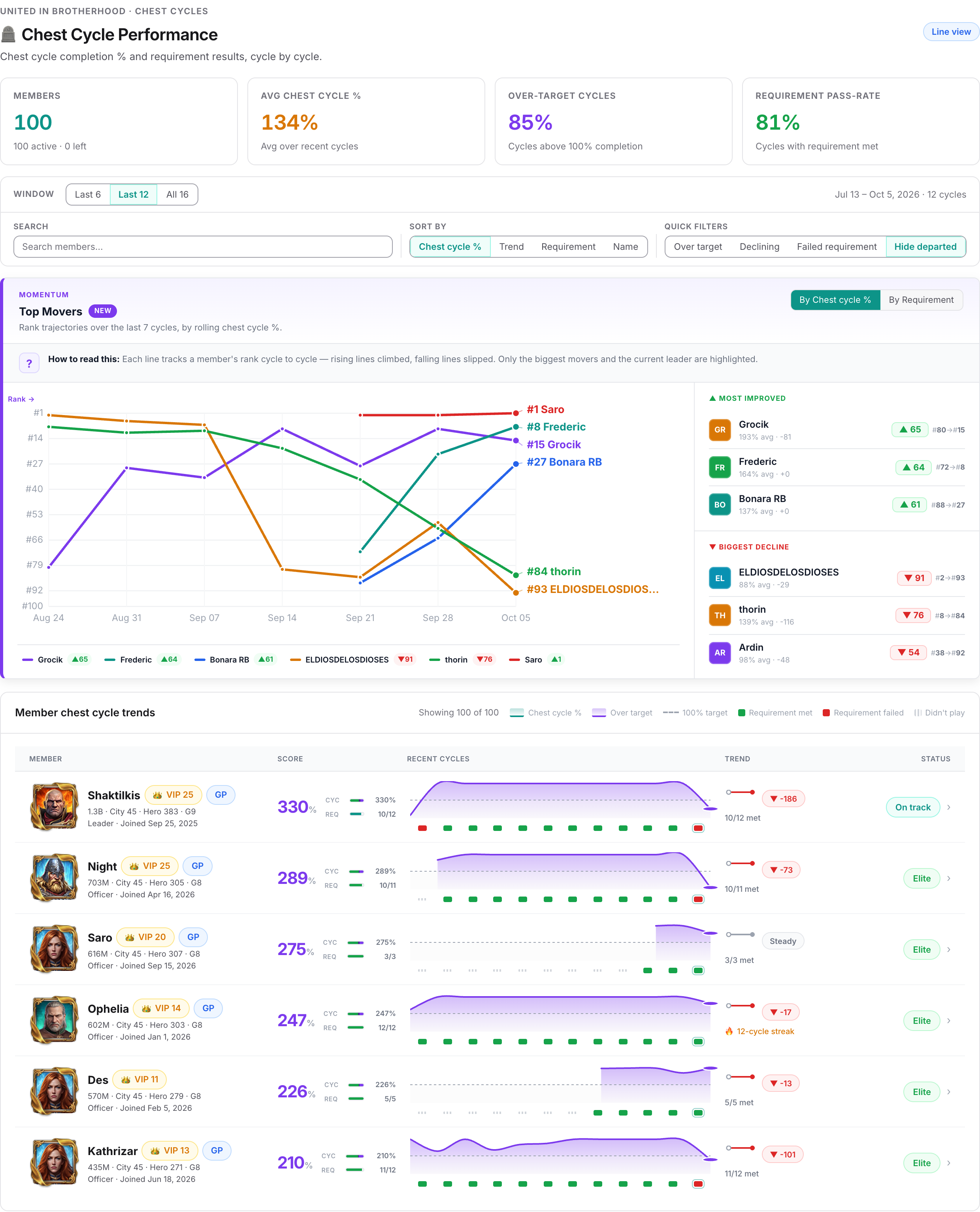
Last 6, Last 12 or All 16. Sixteen is the hard maximum — the page loads the sixteen most recently ended cycles that have already started, and no more, however long your clan's history is. The line beside the selector spells out the exact range and cycle count.
- Members — how many members the page is covering, split as active and left.
- Avg crypt % — the average of every listed member's own average.
- Over-target cycles — the share of member-cycles in the window that finished above 100%.
- Requirement pass-rate — the share of member-cycles in the window where the requirement was met.
The last two count only cycles a member actually took part in. A cycle a member sat out is not counted as a failure.
Search by name, sort by Crypt %, Trend, Requirement or Name, and use the quick filters Over target, Declining, Failed requirement and Hide departed. Hide departed starts switched on.
Clicking a name opens a panel with four tiles — Avg crypt %, Over target, Requirement met, Penalties — then a Cycle breakdown table with one row per cycle: Cycle, Crypt %, Points, Requirement and Penalty. Cycles the member was absent for read Didn't participate.
Above the table, Requirement source tells you which rule set that member's target. In practice it prints only two answers: G-level and Legacy target — the second meaning the single target the whole clan shares.
A dash there is not missing data. Two real cases render as —: a member whose target came from a Might bracket, and a member covered by an override rule. Neither is wired up to a label, so the screen falls back to the dash. When you see one, open the cycle itself under Clan Management → Chest Cycles and read the requirement editor to find out which rule that member fell under.
Top Movers
The movers chart plots each highlighted member's rank cycle by cycle, over the last seven cycles of your window at most. Lines that rise climbed the ranking; lines that fall slipped. Only the biggest climbers, the biggest fallers and the current leader are drawn — with a full roster the chart would be unreadable.
The By Crypt % / By Requirement toggle changes what the ranking is built from. Either way it is a rolling figure over a member's three most recent cycles, not a single cycle, so one strong week moves a line but does not throw it to the top. The chart needs at least two cycles in the window to appear at all.
The status word beside each member
The status describes how a member is performing, not which way they are heading — the trend is shown separately in its own chip. A strong member who is sliding is still strong.
| Status | Given when |
|---|---|
| Elite | Average at or above 120% and at least 90% of requirements met. |
| At risk | Two or more requirement failures in a row, or a pass-rate below 65%, or an average below 70%. |
| On track | Average at or above 90% and at least 80% of requirements met. |
| Watch | Everything in between. |
A member's average is taken over their six most recent cycles inside the window that they actually played, so a member who joined recently is judged on the little they have. The trend chip compares their last three played cycles with the three before those.
The card on a member's profile
Opening a member from Clan Management → Clan Members gives a different layout of the same data — a running balance rather than a trend. The card is titled 🔒 Chest Cycle Statistics.
- Columns: Older (N) for everything before the five most recent cycles, then Cycle 5 through Cycle 1 with their date ranges, then Total. The running cycle is tagged (cur), and each column is labelled Current, Closed or Pending — Pending meaning a cycle whose dates have passed that nobody has closed yet.
- Rows: Chest Points, Penalties and Accumulated.
- Accumulated is a running balance across the columns — each cycle's chest points minus its penalties, added to everything before it, starting from the Older bucket.
Because the Penalties row follows the same rule as the column on the clan page, a negative Accumulated means penalties other than shortfall carry-overs have outgrown the member's chest points. It is a reading aid, not a debt the member owes.
What a member sees of their own
On My Progress, 🏰 Chest Cycle Trend draws the same completion line and pass/fail marks, and 🧾 Points Statement lists one row per cycle with Cycle start, Chest Points, Penalties, Carry over from last, Net points, Target and Carry over. That statement is the one place where the shortfall carry-over is shown plainly, which makes it the right screen to open when a member disputes a figure.
When these screens look wrong
- A member is missing. Departed members are hidden by default — switch off Hide departed. Departed members who took no part in any loaded cycle are left out entirely. And anyone past the first 60 rows needs a search.
- The figures are behind. Every number here is stored and rebuilt in the background after chests arrive, after a cycle is closed, or after a points recalculation. Straight after an import they can lag briefly.
- A target changed but the screen did not. Editing a cycle's targets does not rebuild the stored figures. The old target and the old pass/fail result stay on screen until something else triggers a rebuild.
- Nothing at all is shown. No crypt cycle data yet means one of two things: the clan has no cycle that has started, or the page found no members to list. It does not mean "nobody scored" — a roster of members who all collected nothing still fills the table, every row reading zero.
For everything to do with creating, closing and repairing cycles — including why cycle totals and cycle chest lists can disagree — see the guide Setting up chest tracking cycles.
Common questions
What does the "Older" column add up?
On a member's profile card the five most recent cycles get a column each; Older (N) is everything before those, added together, with N being how many cycles it covers. It exists so the running Accumulated balance starts from the correct figure instead of from zero.
The clan-wide page works differently: it has no "older" bucket at all and loads the sixteen most recent cycles.
Why is the Penalty column empty for a member who was definitely penalised?
Because the most common penalty type is filed separately. If your clan charges members exactly the points they were short — the default method — those penalties are excluded from the Penalty figure on the statistics screens. They appear on the member's 🧾 Points Statement card under Carry over from last, and in full on Clan Management → Penalties Applied.
Clans that use a fixed penalty amount instead do see their crypt penalties in the Penalty column.
A member shows over 100% but the requirement is marked failed. Which is right?
Both. Crypt % is chest points against the target with penalties left out; the requirement result uses points with penalties included, so a penalty carried in from the previous cycle can push a member below their target while the percentage still reads above it.
The other cause is a chest count target the member missed. That only produces a failure when the cycle is set to AND — meet points AND chests — which an admin chooses per cycle in the requirement editor. Cycles default to OR, where either target clears the member, so a missed chest target on an OR cycle leaves the requirement marked as met.
Careful with the reverse case: on a cycle where everyone shares one target, the requirement result you are reading is always the OR one, but the penalty raised at close demands both. A member can be marked met here and still be charged.
Why does a member show 200% when they clearly collected more than that?
The percentage is deliberately capped at 200% for display. Without it, one member with a huge cycle flattens every other line on the chart into a straight line at the bottom. Open the member and read the Points column in the cycle breakdown for the real figure.
Related