Docs → Clan Administration → Understand the penalty system
⚖️ Understand the penalty system
Read any penalty in your clan: what produced it, why it lands in the cycle after the one it belongs to, how to configure the rules, and how to remove or restore one.
What a penalty actually is
When a member asks why their points dropped, the answer is almost never "the portal changed your score". A penalty in the TB Clan Portal is a separate record with a negative value — an entry that sits next to the chests the member collected, pointing at one of your own penalty chests. Nothing they earned is edited, reduced or overwritten.
That one fact explains most of the behaviour in this guide:
- Chest points and penalty points are counted in two separate columns everywhere. A penalty never lowers the "points collected" figure.
- The two are added together only when a number is displayed or a target is judged. That combined figure is what the close run compares against the target.
- Because nothing was overwritten, removing a penalty puts the cycle totals it affected back exactly as they were.
- A penalty carries a date, and that date decides which cycle it counts in. Almost every surprise in this system comes from that date.
Every penalty your clan can produce
There are eight distinct things that can write a penalty. Six of them come from the four clan-wide rules you switch on once — the crypt rule and the Gold Pass rule each have two modes — and the last two belong to events.
| Rule | What triggers it | When it is written | Which cycle it lands in |
|---|---|---|---|
| Chest Cycle Penalty — missing sum | Member finished the cycle below their point target. The penalty equals exactly the points they were short. | When you press Close on a cycle | The next cycle |
| Chest Cycle Penalty — fixed value | Same trigger, but every member who missed gets the same flat amount. | When you press Close on a cycle | The next cycle |
| Login Penalty | Member logged in to the portal on fewer separate days than your minimum, inside the cycle window. | When you press Close on a cycle | The next cycle |
| No-User Penalty | The member has no active portal account linked to them at all. | When you press Close on a cycle | The next cycle |
| Gold Pass Penalty — at close | The portal has not recorded an active Gold Pass for the member. | When you press Close on a cycle | The next cycle |
| Gold Pass Penalty — monthly | Same check, but on a fixed day of the month. | Automatically, without any action from you | Whichever cycle is open at that moment |
| Event penalties (points, chests, chat) | Member failed a point goal, a chest goal or the chat requirement on an event. | When you close the event | The open cycle covering the event's end |
| Event resource-goal penalty | Member did not reach the resource goal for their Guardsmen level on a resource event. | When the resource results are applied | The event's target cycle |
These rules do not exclude one another. A member who missed the target, has no portal account and no Gold Pass can collect three or four separate penalty records from a single cycle close, plus more from any event you close afterwards.
What creates a penalty, and when
Nobody types a penalty in
No clan admin can create a penalty. There is no "add penalty" button on any page you can reach — you cannot penalise one member on the spot, and you cannot record a penalty for something that happened in game. In practice every penalty you will see was produced by one of the eight rules above, so when a member says "an admin gave me that penalty", start by finding which rule did it. The rest of this guide is about exactly that.
A cycle is never closed for you
Nothing in the portal — no background task, no timer, no rollover — moves a cycle to Closed. A cycle stays open until an admin presses Close on the Chest Cycles page — it does not keep collecting in the meantime, because chests are filed by when they were collected. End-of-cycle penalties are calculated and written at that exact moment. If you never close a cycle, those penalties are never produced, no matter how carefully the rules are configured.
1. The monthly Gold Pass penalty is fully automatic. If you have configured it, the portal charges members without a Gold Pass once per calendar month, into whichever cycle is open at that time. No close is involved.
2. Support can run a manual catch-up that applies missed end-of-cycle penalties to expired cycles without closing them. It never runs on its own.
The monthly Gold Pass rule fires early, on purpose or not
The monthly check runs on a quarter-hour schedule and accepts anything within 15 minutes of your configured time. In practice the tick before your time matches first, and a guard then blocks the run at the exact time. A clan that sets Time (UTC) to 17:00 gets its penalties stamped at 16:45 UTC; a clan that leaves the time empty is treated as 12:00 and gets 11:45. Plan around the quarter-hour before your chosen time, not the time itself.
Where an end-of-cycle penalty lands — the part that surprises everyone
This is the most misread behaviour in the portal, so read it slowly. When you close a cycle, the penalties produced by that close are not written into the cycle the member failed. They are written into the next cycle, stamped with a date one minute after that next cycle begins. The failed cycle is recorded only as the penalty's origin.
So on the morning after a close, your brand new cycle already contains negative records. A member opens the portal, sees a fresh cycle at −1,000 points before collecting a single chest, and asks what happened.
They are not left guessing. On My Progress the member's Points Statement shows one row per cycle with the columns Chest Points, Penalties, Carry over from last, Net points, Target and Carry over. If your clan uses the missing-sum method, a missed-target penalty appears under Carry over from last — which is exactly what it is: a debt carried in from the cycle before. If you use the fixed-value method instead, it appears in the ordinary Penalties column of the cycle it landed in, not as a carry-over.
Missing-sum penalties compound
If you use Use missing sum from last cycle — which is the default — the penalty is the exact shortfall, and the shortfall is calculated on the member's net points, which already include the penalty carried in from last time. Penalties therefore snowball unless performance improves.
- Target is 5,000. The member collects 4,000. Shortfall 1,000, so a penalty of −1,000 is written into the next cycle.
- In that next cycle they collect 4,000 again — identical performance. Their net is 4,000 − 1,000 = 3,000. Shortfall against the same 5,000 target is now 2,000, so the penalty is −2,000.
- Third cycle, still 4,000 collected: net 2,000, penalty −3,000. And so on.
Nothing on screen warns about this. If a member is stuck slightly below target every cycle, their penalty grows every cycle even though nothing about their play has changed. Either raise their exemption status, lower their target, or switch that rule to a fixed value.
The two exceptions
The next-cycle rule applies only to penalties produced by a close. Monthly Gold Pass penalties land in the cycle that is open when they run, dated at that moment. Event penalties land in the open cycle covering the event's end date plus any grace hours you configured, dated at that moment — or, if it falls outside that cycle, one hour after the cycle starts. An event's own window has no relationship to your cycle boundaries; only the landing spot of its penalties does.
The next cycle must already exist, and start at exactly the right minute
Because end-of-cycle penalties are written into the next cycle, that cycle has to be there first. The portal looks for a cycle belonging to your clan whose Start Date equals the closing cycle's End Date — the same date and the same minute. If it does not find one, no end-of-cycle penalties are written at all. Not delayed, not queued — not written, for all four close-time rules at once.
So closing your clan's most recent cycle when no later cycle exists always produces zero penalties, and a boundary that is off by one minute is enough to skip everything. Not one hour, not one day — one minute.
The portal does warn you first
You are told before you confirm, in three places:
- The close preview shows a yellow banner: "No adjacent next cycle found (starting at …). Penalties will NOT be applied — only the cycle status will change to Closed."
- The same preview shows a tile reading Next Cycle: None with "No penalties possible".
- The Chest Cycles page carries a standing banner, Cycle Date Issues Detected, listing every gap or overlap with the exact size — including "GAP: 1 minute(s)". Its instruction is the fix: edit the cycles so that one cycle's end date matches the next cycle's start date exactly.
Before you close a cycle
If Cycle Date Issues Detected is showing, fix the boundaries before doing anything else. Every listed gap is a close that will produce nothing.
Press Add Chest Cycle. The create form defaults the start date to the latest cycle's end date, so accepting the default gives you a correct boundary. If you type the date yourself, match the minute exactly.
Press Close on the cycle's row. The preview lists, per member, who will be penalised and by how much, who met their requirement, who is exempt and who joined too late to count. Each listed member has a checkbox — ticking it skips all penalties for that person on this close only. The choice is not saved anywhere.
The preview does not model the Gold Pass rule at all. If you run Gold Pass penalties at close, more penalties will be written than the count on the button promises.
If you closed without a next cycle
The penalties are recoverable, but not automatically. Create the missing cycle so that its start date matches the closed cycle's end date exactly, then Re-open the closed cycle and close it again. The penalty run happens from scratch on the second close. Read the re-open section below first, because re-opening has side effects of its own.
Configuring your clan's penalty rules
Step 0 — you need penalty chests first
Every penalty rule asks you to pick a penalty chest, and that list is built from your own Chest Catalog. If you have not flagged any chest as a penalty chest, every dropdown is empty and no penalty can ever be written, whatever the toggles say.
Add a chest, name it after the rule it will represent, and switch on Mark as penalty chest. Do not flag normal chests.
The four clan rules, field by field
All four live on Clan Management → Clan Settings, on the Penalty System card — press Edit to open its slide-over. The card header shows how many of the four are active.
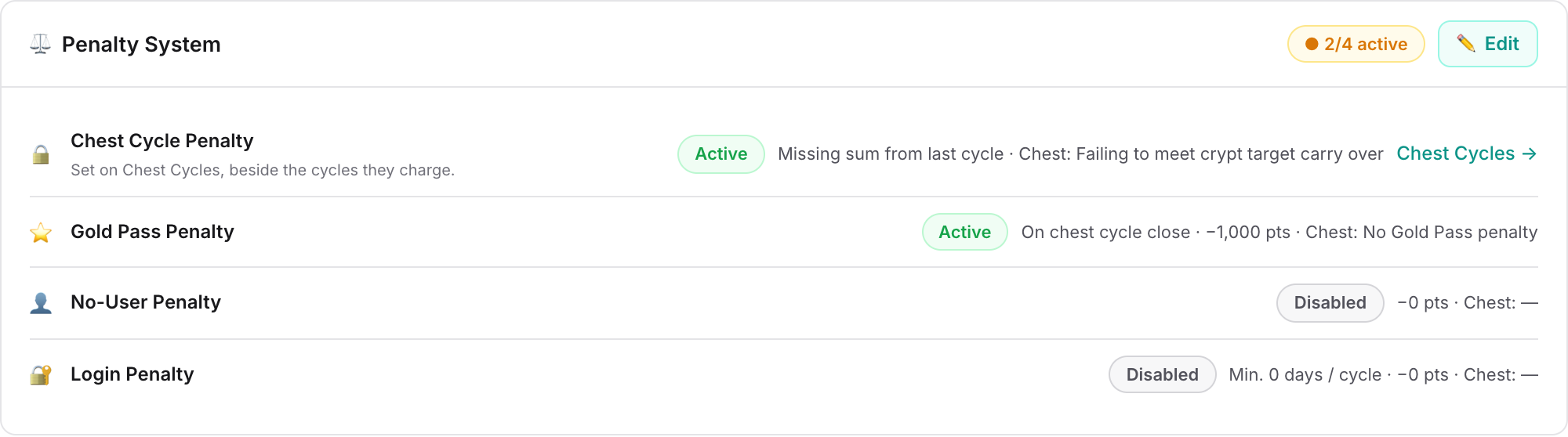
| Field | What it does | Default |
|---|---|---|
| Enable Chest Cycle Penalty | Penalises members who finished below their target. | On |
| Use missing sum from last cycle | On: the penalty is the exact shortfall, and the Penalty Value field is hidden. Off: every member who missed gets the flat Penalty Value. | On |
| Penalty Value (crypt) | The flat amount, used only when missing sum is off. Entered as a positive number, applied as negative. | 0 |
| Enable Login Penalty | Penalises members who logged in to the portal on too few days. | Off |
| Minimum login days per cycle | Counts separate calendar days with a successful portal login inside the cycle window. At 0 the rule does nothing even when enabled. | 0 |
| Enable No-User Penalty | Penalises members with no active portal account linked to them. | Off |
| Enable Gold Pass Penalty | Penalises members the portal has not recorded as having a Gold Pass. | Off |
| When to apply penalty | When a Chest Cycle closes or On a specific day each month. These are completely separate engines — one runs only at close, the other only on the schedule. | At close |
| Day of month (1-28) | Monthly mode only. | Not set |
| Time (UTC) | Monthly mode only. Left empty, the portal uses 12:00 — and fires at 11:45 (see above). | Not set |
| Penalty Value (login, no-user, Gold Pass) | Each of these three rules has its own flat amount, entered as a positive number and applied as negative. Left at 0, the rule still writes a record — worth zero points. The monthly Gold Pass mode is the exception: below 1 it skips the clan entirely and writes nothing. | 0 |
| Penalty Chest | Which of your penalty chests this rule uses. Each rule has its own. Without it, the rule writes nothing. | Not set |
Note the shape of the crypt rule's default: it is on out of the box, with the missing-sum method, but with no penalty chest. So a brand new clan has the rule enabled and produces nothing until a chest is chosen — and then starts producing shortfall penalties on the next close, immediately and at full size.
One label to distrust: the Gold Pass summary line on the Penalty System card always reads "On crypt close", even for clans set to the monthly day. Open the slide-over to see which mode you are actually on.
Targets, and who the crypt rule judges
The crypt rule compares the member against the target set on the cycle itself, not on the penalty settings.
- On a simple cycle, everyone shares one point target and one optional chest target, and the member must meet both.
- On a cycle with per-Guardsmen-level or per-Might-bracket targets, each group has its own point target, its own chest target and its own Penalty Enabled switch. Turning that switch off spares the whole group from the crypt penalty — but not from the login, no-user or Gold Pass rules.
- On those cycles the default combination is either: a member who misses the point target by any margin still escapes the crypt penalty if they hit the chest target. If you meant the chest target as a bonus, you have accidentally created an escape hatch. Change the cycle's combination setting to require both.
- If a member joined the clan part-way through the cycle, their target is scaled down in proportion to how much of the cycle they were present for. If they joined after the cycle had already ended, they are skipped entirely.
Event penalties are configured on the event
Event penalty values and chests live on each event, not in your clan settings, and they all default to 0 with a grace period of 0 hours. New events inherit whatever defaults you have set for that event type.
Exemptions
There are four independent ways to spare a member, and they work at different levels.
| Where you set it | Scope | What it skips |
|---|---|---|
| The member's own page, reached from Clan Management → Clan Members | Permanent, per member, per clan | Apply Penalties is the default. No Crypt Penalties skips only the missed-target penalty — login, no-user, Gold Pass and event penalties still apply. No Penalties skips every clan rule and marks the member as fully excluded from event failure checks too. |
| Penalty Enabled, in a cycle's requirements dialog | A whole Guardsmen level or Might bracket, for one cycle | The crypt penalty for that group only. |
| Exclude from penalty, on an event's tracking rows | One member, one requirement, one event | That single requirement. A member set to No Penalties gets this ticked automatically when the event's tracking rows are created. |
| Close preview checkboxes | One member, one close | All four close-time penalties for that member, this once. Nothing is saved — the next close starts fresh. |
Removing a penalty, restoring it, and re-opening a cycle
What you can change
Open Clan Management → Penalties Applied, or the penalty list on a member's page, and you can:
- Edit — the points and the date, nothing else. The member, the chest and the rule that produced it cannot be changed.
- Delete — the record is hidden, not erased, and every affected cycle total is recalculated. It stays visible to admins with a struck-through style so it can be brought back.
- Restore — puts it back, exactly as it was, and recalculates again. Members do not get a second notification when a penalty is restored.
- Bulk delete or restore — tick individual rows, or a whole group, and confirm. The confirmation shows how many records and how many points are involved.
Members see only active penalties, never the deleted ones, because they cannot restore them.
Re-opening a cycle
Re-opening a closed cycle rolls back the penalties that that close produced — they are marked deleted, exactly as if you had removed them by hand. The confirmation says so: "This will roll back ONLY auto penalties created at close (not event penalties)." Event penalties are genuinely left alone. Closing the cycle again runs the whole penalty pass from scratch.
What never changes by itself
Penalties are frozen at the moment they are written. Changing a penalty value, swapping the penalty chest, editing a cycle's targets or fixing your catalog has no retroactive effect on penalties that already exist — and the per-cycle Recalculate Points action deliberately skips them. If an existing penalty is wrong, the only fixes are editing its points or deleting it.
How penalties affect totals, standings and rewards
- Cycle statistics and progress. Points collected and penalty points are shown as two figures. The requirement check adds them together — that combined figure is what decides pass or fail, and what the next shortfall is measured from.
- Chest counts. Penalty records never count as chests claimed in a cycle, and they are excluded from the pass/fail check and the stored statistics on an event. A few event screens still count them if you ever point a penalty chest at a chest the event tracks — so keep penalty chests out of your event chest selections.
- The breakdown split. On the cycle statistics breakdown, the crypt-versus-other split counts only missing-sum penalties as crypt — if you use the fixed-value method, your crypt penalties are filed under "other". The Crypt/Other figures on Penalties Applied use a different rule entirely; see the warning further down.
- Reward ledgers work differently. When you build a reward ledger from a chest cycle, penalties are subtracted from each member's points and from whether they met the requirement. That is a different number from the one on the cycle statistics page for the same member and the same cycle. Neither is broken; they answer different questions.
- AI penalty score. Each member starts at 100 and, by default, loses 20 points per penalty received in the last 30 days, hitting 0 at 5 penalties. The lookback window, the deduction per penalty and the number of penalties that force a zero are all adjustable on Clan Management → AI Insight Settings, on its Penalties tab, so check your own values before quoting these numbers to a member. Members set to No Penalties are held at 100 by default.
- Notifications. The member is notified the moment a penalty is created: "A penalty chest '…' (… points) was added to your record on …". You can turn the matching admin-side notification on or off on Clan Management → Clan Settings, on the Admin Portal Notifications card, under Penalty added.
When a penalty looks wrong
Almost every penalty dispute is answered by two things: the date on the record, and the name of the chest.
The menu entry reads Penalties Applied; the page's own heading reads Applied Penalties. It is the same page. It opens on the current chest cycle, with arrows to step to the previous or next one. You can also switch to This Month, Last Month or a custom range. A custom range is limited to 90 days; a longer or reversed range shows a warning and loads nothing. Switch between Per Player and By Type to group by member or by penalty chest.
A record dated one minute after a cycle started belongs to the previous cycle's close. A record dated mid-cycle was produced by the monthly Gold Pass rule or by an event close.
The chest name identifies the rule, as long as you gave each rule its own chest. The amount narrows it further — see the table below.
| What you see | What it is |
|---|---|
| Dated one minute after a cycle start | One of the four close-time rules, triggered by the previous cycle's close. |
| An odd, member-specific amount | A missing-sum crypt penalty. The amount is the exact shortfall, so no two members match. |
| The same amount for many members at once | A fixed-value crypt penalty, or the login, no-user or Gold Pass rule. |
| Dated mid-cycle, same day every month | The monthly Gold Pass rule. Check the quarter-hour before your configured time. |
| Dated at an event's end, or one hour after a cycle start | An event penalty. The chest is the one configured on that event. |
| An exact multiple of your event chest penalty value | The event chest penalty, multiplied by how many chests the member was short. |
| A penalty worth 0 points | A clan rule (login, no-user or Gold Pass at close) or an event rule that has a penalty chest chosen but its Penalty Value left at 0. The crypt rule is the one exception — it never writes a zero-point penalty. |
One cue this page cannot give you: Penalties Applied does not show where a penalty came from. If you want to see that a record was written by an automatic rule rather than collected as a chest, open the member on Chest Cycle Points instead — that page does show the source.
Common conclusions
- "It is on the wrong cycle." It is not — end-of-cycle penalties are meant to land in the following cycle. If your clan uses the missing-sum method, point the member at Carry over from last on their Points Statement; on the fixed-value method, point them at the Penalties column of the cycle the record landed in.
- "It is far too large." Compare the member's last three cycles: if the penalty grows by a steady amount each time while their chest points stay flat, it is the missing-sum snowball.
- "They were exempt." Check the status on their member page. If someone used the exclusion on Chest Cycle Points instead, it did nothing.
- "Nobody was penalised at all." The cycle was never closed, no penalty chest is configured, or the next cycle did not start at the exact minute the closed one ended.
- "They hit the chest target." On a simple cycle both targets must be met; on a per-group cycle either is enough by default.
▶Deep dive — every timestamp a penalty can carry
End of cycle: one minute after the next cycle's start. Note that the Gold Pass option label on the settings screen says five minutes — the record is stamped at one.
Monthly Gold Pass: the moment the run fires, which is the quarter-hour before your configured time.
Events: the event's end date plus its grace hours; or, if that moment falls outside the cycle the penalty is routed into, one hour after that cycle's start. Resource-goal penalties are dated when the results are applied.
Common questions
Can I add a penalty to a member myself?
No. The portal has no way for a clan admin to create a penalty by hand — in practice every penalty you will see was produced by one of the automatic rules. What you can do is remove a penalty, restore one you removed, or change an existing penalty's points and date.
Why does my brand new cycle already show penalties?
Because penalties from a cycle close are written into the next cycle, dated one minute after it starts. They belong to the cycle you closed. On their Points Statement, members using the missing-sum method see the same amount under Carry over from last; on the fixed-value method it shows in the ordinary Penalties column instead.
I closed a cycle and nobody was penalised. What went wrong?
Work through four things: the cycle was actually closed (nothing closes it for you); a penalty chest is selected on the rule; the rule itself is enabled; and a cycle exists that starts at exactly the minute the closed cycle ended. That last one is the usual answer — a one-minute mismatch skips every end-of-cycle penalty, and the close preview warns about it before you confirm.
A member's penalty grows every cycle even though their score has not changed. Why?
That is the missing-sum method compounding. The shortfall is measured on the member's net points, which already include the penalty carried in from the previous cycle, so a member who is stuck below target falls further behind each time. Switch that member to a lower target, change their penalty status, or use a fixed penalty value instead.
If I delete a penalty, does the member get their points back?
Yes, and nothing is lost. A penalty never edited the points they collected — it was a separate negative record — so removing it recalculates the cycle totals back to where they were. You can restore it later if you change your mind; the member is not notified again when you do.
Is re-opening a cycle safe?
Yes. It rolls back the penalties that close produced and re-closing recreates them. Everything the close did not write is left standing: event penalties, monthly Gold Pass penalties, and any penalty you added by hand. Both this cycle's totals and the following cycle's — where the rolled-back penalties actually sat — are rebuilt for you, so there is nothing to run afterwards.
The one thing to keep in mind is that re-closing works the penalties out from your current settings, so a rule you changed in between changes what people are charged.
Why does the member details page say a member met their requirement when they were penalised?
On a cycle with one shared target for everyone, the status column accepts either the point target or the chest target, while the penalty run requires both. When they disagree, what happened at close is what counts.
Does the point value on my penalty chest matter?
No. The amount always comes from the penalty rule — either the shortfall or the value you typed into the rule. The catalog chest only supplies the name. If a rule's value is 0 and it does not use the missing sum, it writes penalties worth zero points — apart from the monthly Gold Pass mode, which writes nothing at all until you set a value.
Related