Docs → Chest Cycles → Setting up chest tracking cycles
📅 Setting up chest tracking cycles
Set up chest tracking cycles from nothing: prerequisites in order, choosing a length and start time, chaining cycles without gaps, and closing one correctly.
What a tracking cycle is, and what it gives you
You want to say, at the end of the week: these members pulled their weight, these did not, and here is the number that proves it. A tracking cycle is what makes that sentence possible.
A cycle is a window with an exact start and end — say 18 August 17:00 UTC through 25 August 17:00 UTC. Every chest is filed against the cycle whose window contains the moment it was collected. Once a cycle exists, the portal can:
- show each member's chest points for that window against a target you set;
- mark each member as meeting or missing the requirement;
- compare a member against their own earlier cycles;
- penalise the members who missed — at the moment you close the cycle, and only then (monthly Gold Pass penalties and event penalties are the exception: neither needs a cycle close);
- answer the in-game chat commands
chestsandmewith this cycle's figures.
Without a cycle, chests still arrive and are stored — you can see them on Claimed Chests — but they count towards nothing. No target, no progress, no penalty.
Nothing closes a cycle automatically. There is no timer and no rollover. A cycle stays Open until an admin presses Close. End-of-cycle penalties are calculated and written at that moment. A clan that never closes never gets a single one.
Being left open does not make a cycle keep growing. Which cycle a chest belongs to is decided by when it was collected, so once the end date has passed the cycle takes nothing further — later chests go to the following cycle instead. An unclosed cycle is unfinished, not still counting.
Before you start — the prerequisites, in order
Each step feeds the next. Creating a cycle before these are in place gives you one that runs but penalises nobody, or penalises the wrong people.
On the Chest Grabber card, your clan's chest grabber account must be linked, verified and collecting — nothing downstream exists until chest records land. A cycle over an empty window shows every member at zero and penalises all of them at close.
Every penalty check starts by looking up the member's link to your clan. A player with no clan membership record is skipped by all four penalty types silently and never appears in the close preview.
The join date matters too: joining partway through a cycle scales the target down in proportion to the part of the cycle the member was present for, and joining after the cycle's end date means being skipped entirely.
A chest is worth whatever your catalog says at the moment it is imported, and that value is stored on the chest record. Set your point values before you start tracking, or the first cycle's totals are built from placeholder numbers. Changing them later does not rewrite history on its own — see the last chapter.
The Penalty System card holds every clan-wide rule the close reads. Exemptions for individual members live elsewhere — a standing one on the member's own profile, a one-off one as a tick box in the close preview — and both are covered in the chapter on closing. Four independent rules:
- Enable Crypt Penalty — for members who miss the target. With Use missing sum from last cycle on, the penalty equals exactly the shortfall; with it off, a fixed Penalty Value is used.
- Enable Login Penalty — needs Minimum login days per cycle above 0. It counts distinct days the member logged in to the portal inside the window.
- Enable No-User Penalty — for players with no active portal account linked.
- Enable Gold Pass Penalty — two modes, covered in the chapter on closing.
Each rule has its own Penalty Chest, and it is not decoration. A penalty is written as a chest record with negative points, so a rule with no penalty chest has nothing to write and is skipped without any message. Give each rule a different chest: the penalty lists name the chest a penalty was written as, not the rule that produced it, so the chest name is afterwards your only reliable clue to which rule fired.
Skip this if one target for everyone is enough. Otherwise split the clan by G-Level (one target per Guardsmen level, G1 to G9) or by Might range.
Both screens are opened from the cycles page: Might Brackets and Requirement Templates are buttons at the top of the table, with no menu entry of their own. For Might, build the named ranges on Might Brackets first, then the template that references them — a Might template cannot point at a bracket that does not exist yet.
Create your first cycle, then immediately the one after it. The reason is in the next-but-one chapter: closing a cycle with no cycle starting at exactly its end instant produces zero penalties.
Choosing a cycle length and a start time
The portal imposes no length. A cycle is any window you like, down to the minute, and cycles in the same clan may differ. Two decisions matter more than the number.
Pick a length you will keep to
Seven days is the usual choice: it matches how clans talk about activity, and the create form will then chain each new cycle at the same duration. Six days is the other common pattern. What to avoid is "whatever I get round to" — irregular windows make every cycle-to-cycle comparison on the statistics pages meaningless.
If you never create a cycle and chests start arriving, the portal creates one — starting at midnight on the day of the first chest, running 7 days, with a point target of 0. A fallback, not something to rely on.
Pick a start time, and put it somewhere quiet
Every date field is in UTC — the create form labels the dates section All times are in UTC. Convert from your own time zone once, write it down, and use that clock time for every boundary from then on. Two candidates work well:
- 17:00 UTC, the game's daily reset. The boundary the game uses and the one events use — an event day runs 17:00 UTC to 17:00 UTC. Aligning to it means a cycle and an event that look like they cover the same days actually do.
- 00:00 UTC, midnight. Cleaner for one reason: Chest Dashboard works in whole calendar days when you pick a cycle, so midnight boundaries are the only kind whose dashboard figures match the per-member pages exactly.
Creating your first cycle, step by step
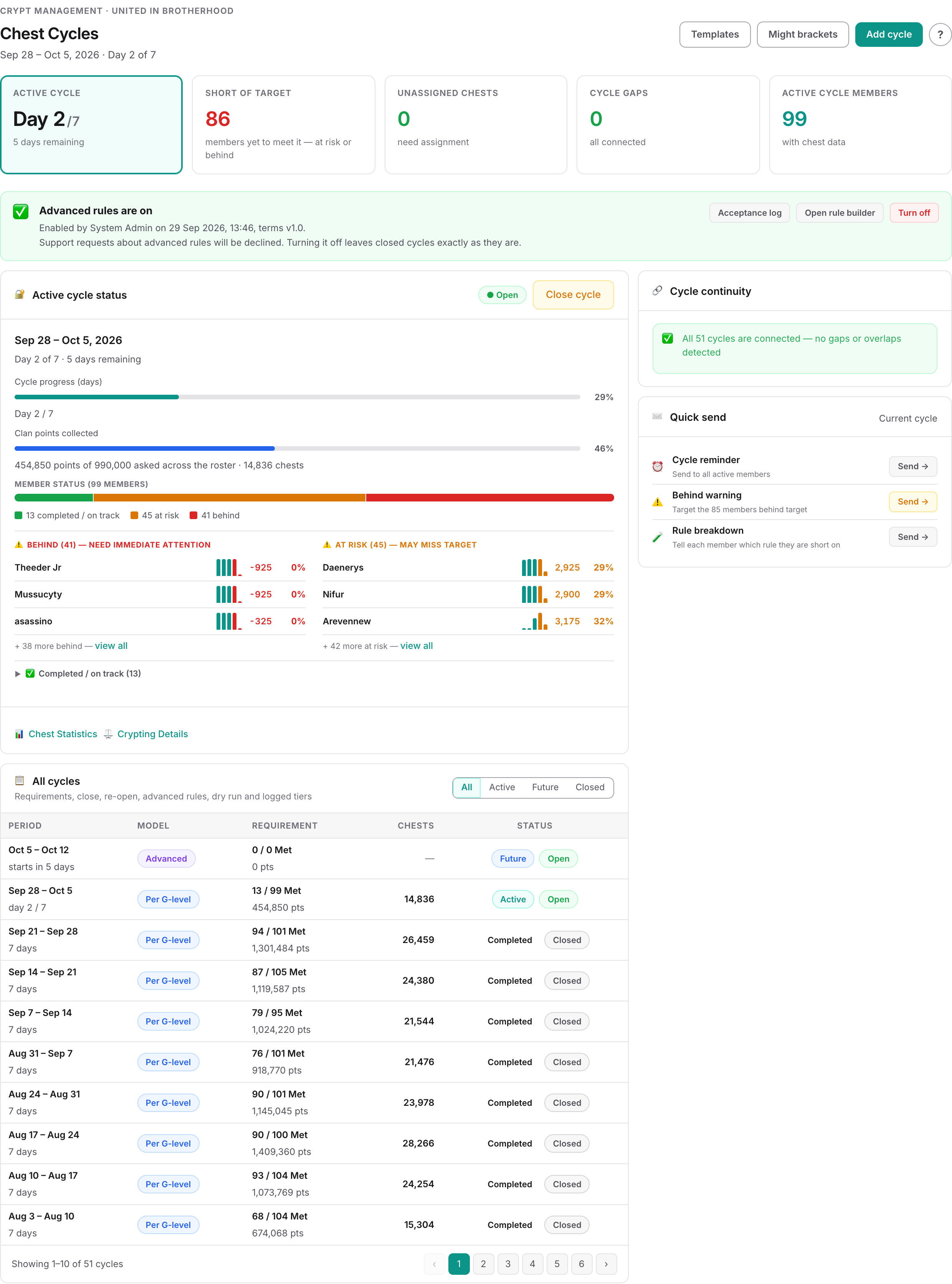
You need to be an admin of the clan currently selected. If a red Cycle Date Issues Detected banner is already showing, deal with that first — it reports gaps or overlaps in existing cycles.
Top right of the table, beside shortcuts to Templates and Might brackets. The panel is headed New chest cycle.
Fill in Start Date & Time and End Date & Time. With no cycles yet, the end defaults to one week after the start. Once cycles exist, the start is pre-filled with the latest cycle's end date and the end with that cycle's duration — exactly the chaining you want, so leave both alone unless you are changing the schedule deliberately.
The end must be later than the start, and a window overlapping an existing cycle fails to save with Date overlap detected. Touching end-to-start is not an overlap; it is the intended shape.
| Option | What it does |
|---|---|
| Simple | One point target for every member, plus an optional chest count target. The right starting point for most clans. The table calls a cycle made this way One target. |
| G-Level template | Copies your saved per-tier targets into this cycle — G1 to G9 and T9, which is a tier of its own. Greyed out until a template exists. The table calls it Per G-level. |
| Might bracket template | Copies your saved per-Might-range targets. Greyed out until one exists. The table calls it Per might bracket. |
| Copy from previous cycle | Copies the previous cycle's targets, including any override rows — extra rules that apply to a chosen set of G-Levels or Might brackets and beat the normal ones. It copies a rule set too, if the previous cycle had one. |
| Advanced rules | Creates the cycle with no targets at all and opens the rule editor, where you build a set of measurable lines per tier. An unsupported opt-in feature with its own guide: Advanced rules. The table calls it Advanced. |
Targets are copied into the cycle when you create it. Editing the template afterwards does not reach back into cycles that already exist.
Simple gives you a point target and an optional chest count. The template options instead give the combining word: OR — meeting either one is enough or AND — must meet both the point target and the chest target. Advanced rules asks for nothing here — its numbers live on the rules themselves.
The new cycle lands with Status showing Open, and Cycle State showing Future, Active or Completed from today's date. The two columns answer different questions and are never reconciled: a cycle whose end date passed weeks ago still reads Completed beside Open until you close it.
When one target per tier is not enough
Everything above gives a tier one point target and optionally one chest count. That is the right shape for most clans and you should stay on it while it fits. If you need to ask something more specific — 1,200,000 points of Epic Crypt chests, and at least 40 crypt chests of any kind, and either 5 Tomb chests or 3 Ancient chests — that is what Advanced rules is for.
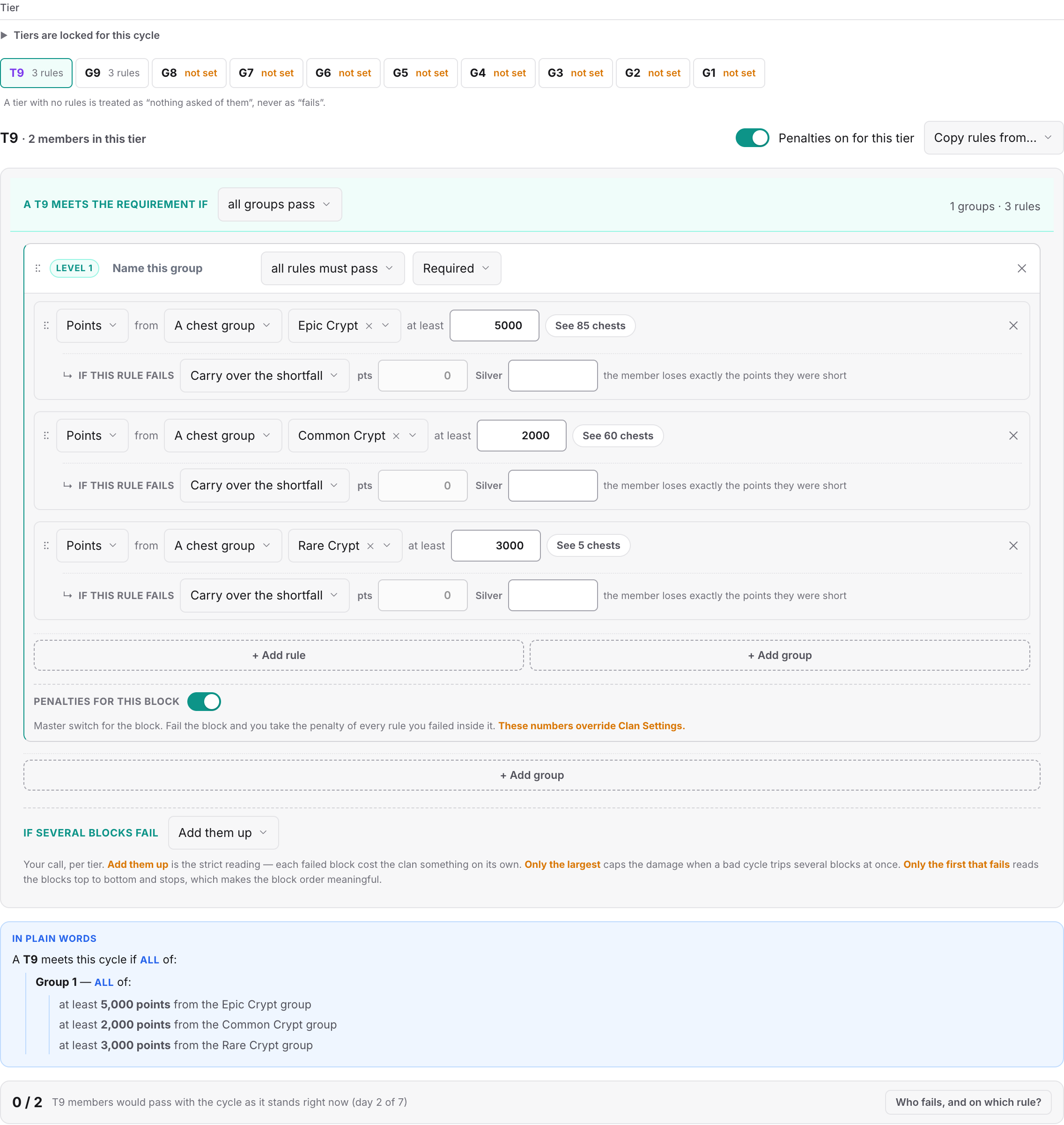
Each tier gets its own set of measurable lines, each line is measured on its own, and each carries its own penalty — so a member who misses one line is charged for that line and nothing else. It is an unsupported opt-in feature: you tick five statements to turn it on, and we will not set the rules up for you or investigate why a member passed or failed.
The whole feature — how a rule, a group and a rule set fit together, exactly what a miss costs, and a worked example — is in Advanced rules: building a requirement out of many lines.
Chaining cycles so there are no gaps
This chapter decides whether your penalties work at all.
One cycle's end date must be exactly the next cycle's start date. Not the same day — the same minute. When you close a cycle, the portal looks for a cycle whose start is that precise instant and writes the penalties into it. If none exists, no penalties are written. A gap of one minute is enough to lose them.
Two things work in your favour here:
- The create form pre-fills the start date with the previous cycle's end date, so accepting the default produces a correct chain.
- A broken chain raises a permanent red Cycle Date Issues Detected banner listing each problem as a GAP or an OVERLAP with the exact size of the mismatch, and repeating the fix: edit the cycles so one cycle's end date matches the next cycle's start date exactly.
| What a gap costs | Why |
|---|---|
| Chests vanish from tracking | A chest collected during the gap belongs to no cycle. It is stored and visible on Claimed Chests, but contributes to no target, no progress and no penalty. |
| Penalties are not created | The closing cycle finds no cycle starting at its end instant, so the crypt, login, no-user and Gold Pass penalties are all skipped. |
| Catch-up cycles stop | Chests arriving past your newest cycle make the portal roll cycles forward for you, copying the previous length and targets — but it never creates one backwards into a gap, and it gives up after 10 forward. Further behind than that and everything new lands untracked. |
If you do close a cycle with nothing after it, the loss is recoverable: create the missing adjacent cycle, then Re-open and Close again. The penalty pass runs from scratch and this time finds its target.
What happens when you close a cycle, in order
Closing is a deliberate review step. Several things happen only at that moment; this is the full list, in order.
First, the preview opens
Pressing Close opens a Close Chest Cycle dialog that is purely a dry run. It sorts every member into groups — crypt point penalties, login penalties, no-user penalties, members meeting their requirements, exempt members, and members who joined after the cycle ended — showing each penalised member's group, target, achieved figure, shortfall and penalty. Two banners can appear:
- Closing early: This cycle hasn't ended yet, warning that current data will be used.
- Broken chain: No adjacent next cycle found, stating that penalties will not be applied and only the status will change. A summary tile repeats it as Next Cycle: ✗ None / No penalties possible.
Then you decide who to skip
Then, on confirm, in this order
- The cycle's Status changes from Open to Closed.
- Every member holding a chest in the closed cycle receives a portal notification that it has been closed. This goes out with the status change, before a single penalty has been worked out.
- Any announcement template set for the cycle-closed trigger is sent — same moment, also before the penalties.
- The crypt point penalty runs, against targets already scaled down for anyone who joined mid-cycle.
- The login penalty runs, for members below your minimum login days.
- The no-user penalty runs, for members with no active portal account linked.
- The Gold Pass penalty runs — only if When to apply penalty is set to When a Chest Cycle closes.
- The cycle's statistics are rebuilt in the background, so figures can lag briefly after the dialog closes.
Every penalty is written as a chest record with negative points into the next cycle, dated one minute after that cycle starts. The member sees it as a carry-over at the top of their new cycle, which is why their Points Statement has a Carry over from last line. It also means the closed cycle's own totals do not move when you close it.
Closing, re-opening and editing a past cycle
| Action | What it does | What it does not do |
|---|---|---|
| Close | Sets the status to Closed, runs the whole penalty pass into the next cycle, rebuilds this cycle's figures. | Does not change the closed cycle's own totals, and does not stop later chests from counting in the window. |
| Re-open | Sets the status back to Open and removes the automatic penalties this close created — the crypt point, login, no-user and close-mode Gold Pass ones. Rebuilds this cycle's figures and the next cycle's, which is where the removed penalties lived. | Does not touch event penalties, monthly Gold Pass penalties, or ones you added by hand. |
| Edit | Changes dates and, on a Simple cycle, the targets. Moves chests that no longer fit the new window. | Does not pull in chests that newly fit a widened window, and does not rebuild the cycle's stored figures — neither the totals after a date change nor the pass/fail results after a target change. |
| Recalculate Points | Rewrites the points on every non-penalty chest in the cycle from the current Chest Catalog, then rebuilds the figures. | Does not touch penalties, epic points, or chests with no matching catalog entry — and it overwrites point corrections you typed by hand. |
A closed cycle is locked
The Edit button disappears the moment a cycle closes, and the requirements dialog becomes a read-only View Requirements. There is no direct way to correct a date or target. The route is Re-open → change → Close again, which re-runs the whole penalty pass against the corrected numbers.
Editing dates moves chests one way only
Chests filed under the cycle whose collection date now falls outside the new window move to whichever cycle covers them, or become unassigned if none does; a message reports both counts. The reverse does not happen — chests that now fall inside a widened window are not pulled in. After widening, open the Unassigned Chests section further down the Chest Cycles page, press Bulk Auto-Assign All, then run Recalculate Points on that cycle — a date edit does not rebuild the stored totals either.
Changing targets does not refresh what is on screen
Editing a cycle's requirements saves the new targets, but the stored figures — the target beside each member and their met/missed result — are not rebuilt then. Chest Cycle Points keeps showing the old target and old result until something else causes a rebuild, such as new chests arriving or a Recalculate Points run. Nothing on screen says so, which is why targets are best changed before a cycle starts.
Deleting
Deleting a single cycle releases its chests: they become unassigned and appear in Unassigned Chests, ready to attach elsewhere.
Reading the cycle statistics
| Page | What it answers |
|---|---|
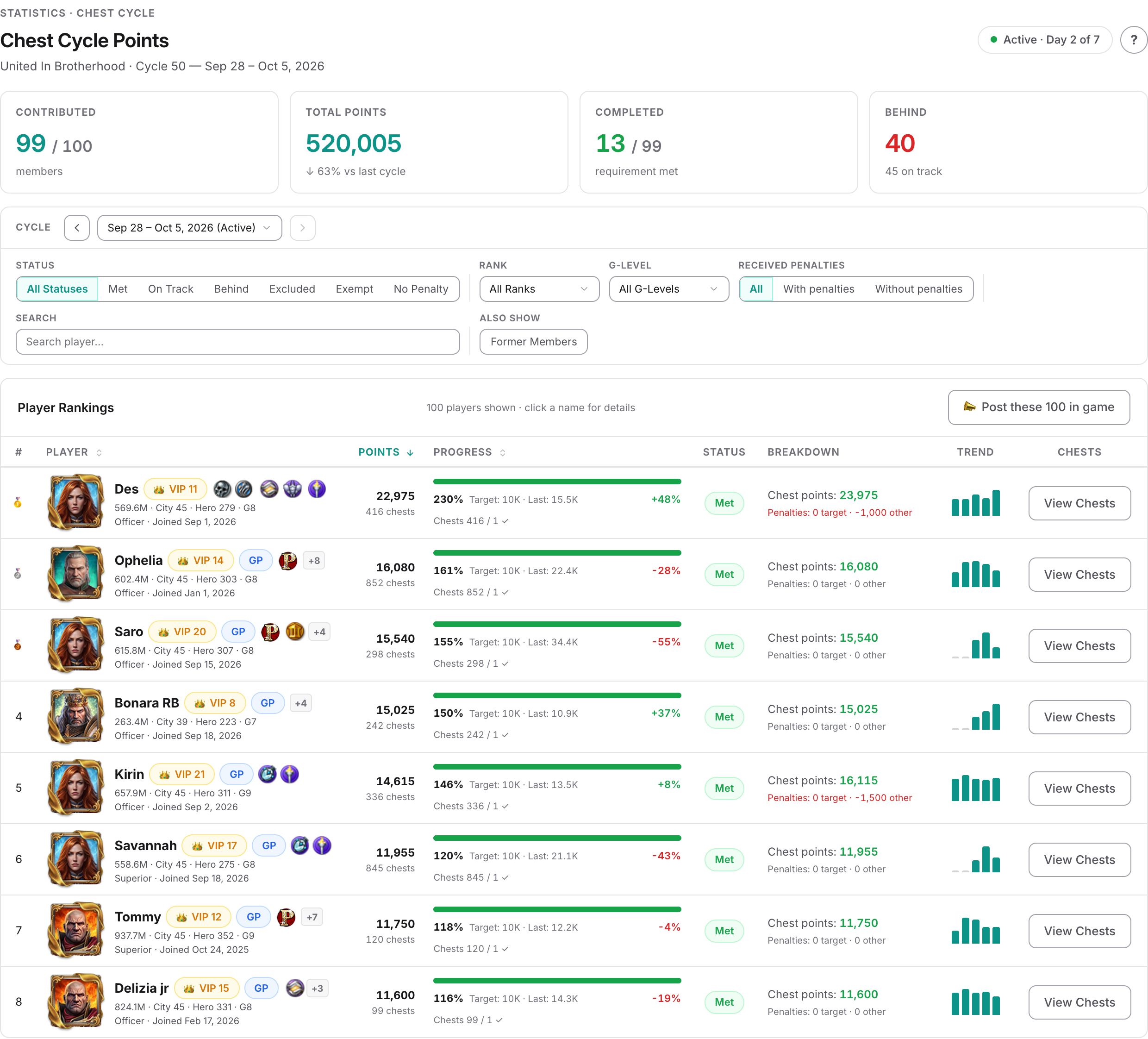
| Chest Cycle Points | Who hit their target this cycle? Per-member points, progress against their personal target, a status of met / on track / behind / excluded / exempt / no penalty, and a five-cycle trend. Click a member for their chests and penalties, or to send a direct message. |
| Chest Cycle Statistics | How is each member trending across cycles? Completion percentage cycle by cycle, requirement results, biggest movers, and filters for over target, declining or failed. Up to 16 cycles per window, 60 members listed at a time. |
| Chest Dashboard | How much is the clan producing overall? Clan-level output with a cycle picker plus rolling 30-day and 90-day views, by source and type. |
| Penalties Applied | Which penalties exist this cycle? Cycle-scoped, with previous and next navigation, grouped by type or by member. Each row is named after the penalty chest it was written as, so name your penalty chests distinctly. |
Members see their own version on My Progress: a points statement per cycle with Chest Points, Penalties, Carry over from last, Net and Target — the carry-over line being how last cycle's penalty is explained to them.
▶Deep dive — the Mismatches button on a running cycle
On a running cycle that uses G-Level or Might targets, a button reads either No Mismatches or Mismatches (N), listing members whose current G-Level or Might bracket differs from what the cycle's stored figures assumed.
The stored level and Might are refreshed every time the cycle's figures are rebuilt — which is every time new chests arrive. A member who levels up mid-cycle is therefore moved into a harder target group partway through a cycle they have already been working on, and Update All Snapshots deliberately adopts everyone's current values. If you want members judged against the level they started with, keep cycles short and check this button before closing rather than after.
Where cycles meet events and penalties
Events and cycles are separate schedules that touch in three places.
Event windows ignore cycle boundaries. An event has its own start and end and may span any number of cycles or sit inside one. Note that an event day runs 17:00 UTC to 17:00 UTC, so a one-day event covers two calendar dates, and a chest collected on the event's start date but before 17:00 UTC falls before the event window and does not count towards it — though it still counts towards its cycle as normal.
Closing an event needs an open cycle. You cannot close an event unless your clan has at least one cycle with Status = Open somewhere; attempting it gives Cannot close event. No open crypt cycle found. Please open a crypt cycle first. Another reason to keep a future cycle created — a clan that has closed everything cannot finish its events.
Event penalties are filed into a cycle. Closing an event writes its penalties as negative-point chest records into an open cycle: the one containing the event's end, or the next open cycle starting after it. On an exact boundary the newer cycle takes them. Re-opening the event removes those records and rebuilds the affected cycles.
So a member's penalty total for a cycle can include penalties with nothing to do with that cycle's chest target. Read the individual rows on Penalties Applied rather than a single total — but be aware of what a row actually tells you: each one is identified by the penalty chest it was written as, not by the rule or event behind it. That is why giving every rule its own Penalty Chest is worth the effort.
When the numbers do not add up
Almost every "the totals are wrong" question has one of these causes.
1. Cycle totals and cycle chest lists follow different rules
A cycle's totals — points, chest counts, targets and pass/fail — are built from each chest's collection date falling inside the window. The chest list, the points statement and the in-game chat commands instead use the cycle each chest is assigned to. Normally they agree, because chests are assigned by date on arrival; they drift apart after you move a cycle's dates, delete a cycle, or reassign a chest by hand. A chest can then be inside the totals but absent from the list, or the reverse.
2. A chest fell in a gap between cycles
It belongs to no cycle: visible on Claimed Chests, counting towards nothing. Three steps, in this order: create or extend a cycle so the window covers that date, run Bulk Auto-Assign All so the chest appears in the lists, then run Recalculate Points on that cycle so the totals catch up — that last step rewrites every non-penalty chest in the cycle from the catalog, so check first that nobody has typed a point correction by hand on a chest in it.
The last step is the one people skip. Totals are built from the collection date, but they are stored figures, and nothing rebuilds them when you create a cycle or edit its dates — until you force a rebuild the cycle keeps showing the old numbers, and a brand-new cycle shows every member at zero. The order matters too: Recalculate Points only appears on a cycle that already has at least one chest attached to it, so the assign step has to come first.
3. Chest Dashboard disagrees with Chest Cycle Points
With a cycle selected, Chest Dashboard works in whole calendar days, so a cycle running 17:00 to 17:00 pulls in the morning of its first day and the evening of its last — parts of the neighbouring cycles. The per-member pages use the exact window. The two match only when boundaries sit at midnight UTC.
4. A bulk edit on Claimed Chests did not refresh the figures
Bulk soft-delete, bulk restore and bulk set-points on Claimed Chests change the records without triggering a rebuild, and nothing repairs it later. Editing a single chest's points inline does trigger one.
After a bulk delete or restore, run Recalculate Points on the affected cycle to force the figures to catch up. After a bulk set-points, do not — it would overwrite the values you typed with the catalog values. Change those rows one at a time instead.
5. The catalog changed but history did not
A chest is worth what the catalog said when it was imported, so catalog edits apply to future chests. To make history follow, run Recalculate Points on each affected cycle — it skips penalties, leaves epic points alone, does nothing for chests that never matched a catalog entry, and overwrites manual point corrections.
6. A member shows "met" but was penalised anyway
The Simple cycle with two targets: the display treats either as enough, the close requires both. Leave Minimum Chest Count (Optional) empty if you want them to agree.
7. The penalty breakdown files things oddly
- The Crypt penalties figure in the per-member breakdown counts only penalties calculated as the exact shortfall. With a fixed penalty value, your crypt penalties appear under Other penalties.
- On Penalties Applied the Other Penalties tile reads zero for most clans, because event penalties are counted under Chest Cycle Penalties. Read the per-penalty list, not the two tiles.
- Most penalty types show the generic label Penalty rather than a specific name, so identify them by the penalty chest name instead — which only tells you anything if each rule has its own Penalty Chest.
8. Nobody was penalised at all
In order of likelihood: the cycle was never closed; no cycle starts at exactly the closed cycle's end; the rule is off on the Penalty System card of Clan Settings; no Penalty Chest is selected for it; or the members concerned have no clan membership record, joined after the cycle ended, or carry a penalty exemption.
- Open Chest Cycles and confirm there is no red date-issues banner.
- Confirm a cycle exists after the one about to end.
- Open the finished cycle's Close preview, read the penalty list, tick anyone who deserves a pass.
- Check the top banner does not say the next cycle is missing, then confirm.
- Create the cycle after next, accepting the pre-filled dates.
Common questions
Does the portal close and start cycles for me automatically?
No. Nothing closes a cycle — no timer, no rollover, no background task. A cycle stays Open until an admin presses Close on the Chest Cycles page, and the end-of-cycle penalties are calculated at that moment. It does not keep collecting in the meantime: chests are filed by when they were collected, so anything after the end date belongs to the following cycle. It is common for cycles to be left open for months, and a clan in that position has never had a single end-of-cycle penalty applied. The other two producers are unaffected: monthly Gold Pass penalties and event penalties need no close at all, and land in whichever cycle is Open at the time.
Starting cycles is partly automatic: if chests arrive with a collection date past the end of your newest cycle, the portal creates the next cycles for you, copying the previous cycle's length and targets — up to 10 of them. It will not create a cycle backwards to cover a gap.
How long should a cycle be?
Seven days is the usual choice and the one the create form keeps chaining for you. Six days is the other common pattern. The portal imposes no limit — a cycle is any window down to the minute, and cycles in the same clan may differ in length.
Consistency matters more than the number: irregular windows make the cycle-by-cycle trends on the statistics pages meaningless.
Why did closing my cycle apply no penalties?
Most likely no cycle starts at exactly the closed cycle's end date and time. The match is exact, so even a one-minute gap loses every penalty. The close preview warns before you confirm, with a banner reading No adjacent next cycle found and a tile reading Next Cycle: ✗ None — but the submit button and the message afterwards still talk about applying penalties, so they are not a reliable check.
It is recoverable: create the missing adjacent cycle, then Re-open the closed cycle and Close it again.
The other common causes are the rule being switched off on Clan Settings, or no penalty chest being selected for it — without a penalty chest there is nothing to write and the rule is skipped without a message.
A chest was collected at the exact moment one cycle ended and the next began. Which cycle gets it?
The cycle that is starting. A cycle window includes its start instant and stops just before its end instant, and each cycle begins at the moment the previous one ended — so the shared instant belongs to the new cycle, in the totals and in the chest list alike.
That means every chest counts once, for exactly one cycle, and you can set your boundary at whatever time suits your clan.
I excluded a member from penalties, so why were they penalised?
The Exclude from penalties action on Chest Cycle Points marks the member on that page and drives its Excluded filter, but the cycle close does not read it.
Two things do work. For a one-off pass, tick that member's Skip box in the close preview — note it exempts them from all four penalty types in that close, not only the one you ticked. For a standing exemption, set their penalty status on their member profile to No Crypt Penalties (blocks the cycle penalty only) or No Penalties (blocks all of them).
Can I fix the dates or the target on a cycle I already closed?
Not directly — a closed cycle is fully locked. The Edit button is hidden and the requirements dialog is read-only.
The route is Re-open, make the change, then Close again; re-closing runs the whole penalty pass fresh against the corrected numbers. Re-opening first removes the automatic penalties that close created — event penalties, monthly Gold Pass penalties and penalties you added by hand are left standing — and re-closing then works the close penalties out again from your current settings.
There are chests in the Unassigned Chests list. Will assigning them raise my totals?
No. Cycle totals are built from each chest's collection date falling inside the window, not from which cycle it is attached to — so a chest sitting inside a window is already counted, assigned or not. The one exception is a cycle you have just created or widened: its stored figures were never built for that window, so run Recalculate Points on it as well. Bulk Auto-Assign All changes what appears in chest lists, points statements and the in-game chat commands; it moves no points.
If a total genuinely looks too low, the cause is usually a gap in your cycle dates, where chests fall outside every window and count towards nothing. Fix the gap first.
Why does Chest Dashboard show different numbers from Chest Cycle Points for the same cycle?
Because they slice time differently. With a cycle selected, Chest Dashboard works in whole calendar days, so a cycle running from 17:00 to 17:00 also pulls in the morning of its first day and the evening of its last — both belonging to neighbouring cycles. The per-member pages use the exact window to the minute.
The two agree only when your cycle boundaries sit at midnight UTC.
I changed a chest's points in the Chest Catalog but old cycles still show the old score.
That is expected — a chest is worth what the catalog said at the moment it was imported, and the value is stored on the chest record. Catalog edits apply to future chests.
To make history follow, run Recalculate Points on each affected cycle from the Chest Cycles page. It rewrites every non-penalty chest in that cycle from the current catalog and rebuilds the figures. It leaves penalties and epic points untouched, does nothing for chests that never matched a catalog entry, and overwrites any point corrections you previously typed by hand on individual chests.
Related