Docs → Chest Cycles → What a chest cycle is
🪦 What a chest cycle is
The window your chest points are measured in: when it starts and ends, how your target is decided, and where to see how you are doing right now.
You have been collecting chests all week and you want to know one thing: does it count, and against what? A crypt cycle is the answer to both. It is the window your chest points are added up in, and the thing your target belongs to.
A cycle is a window with an exact start and an exact end — for example 18 August 17:00 UTC through 25 August 17:00 UTC. Every chest you collect is filed against the cycle whose window contains the moment you collected it. Your clan decides the length, the boundary time and the target; the portal decides nothing on its own.
Where you see your own cycle
Four places show you the same cycle from different angles. All of them are open to any member — you do not need to be an admin.
| Where | What it answers |
|---|---|
| MY → My Progress | Your own record. 🏰 Chest Cycle Trend plots your completion cycle by cycle; 🧾 Points Statement gives one row per cycle with Cycle start, Chest Points, Penalties, Carry over from last, Net points, Target and Carry over — that last column being what the cycle sent forward. |
| MY → Personal Dashboard | The first item in the menu, and the page the portal opens on. The short version, including a Penalties tile with This cycle. |
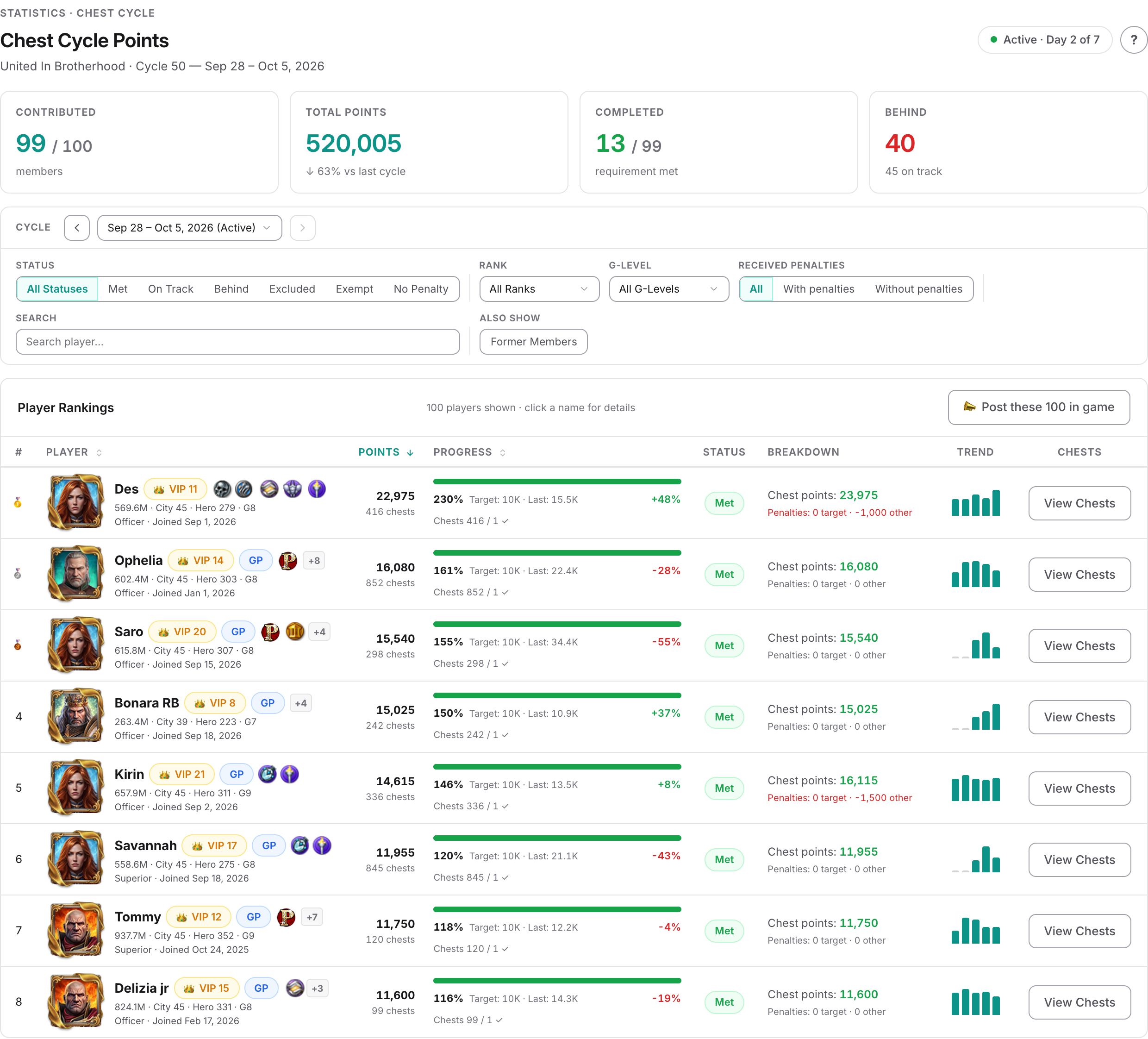
| Dashboards → Chest Cycle Points | Everyone in the clan for one chosen cycle, with a Cycle picker showing each cycle's dates. This is where you see how you compare. The page's own heading reads Chest Points Details. |
| In game | If your clan runs the chat bot, sending it crypt replies with CHEST CYCLE STATUS — your points, penalties, net total, what is required, the difference, and Time Left on the cycle. |
One label on the Points Statement is worth reading carefully. The current chip follows the cycle's Open flag, not its dates — so it marks every cycle nobody has closed yet, not only the one running today. If you see several rows tagged current, that is a backlog of unclosed cycles, and the section below explains why it happens.
How your target is decided
The target is set on the cycle, not on you, and there are four ways a clan can set it.
| Way | What it means for you |
|---|---|
| One target for everyone | A single point target, and optionally a chest count target. Both apply to every member regardless of level. |
| Per G-Level | A target for each Guardsmen level, G1 to G9, plus T9 as a tier of its own. Yours follows the level recorded for you when the cycle opened. |
| Per Might bracket | A target for each named Might range your clan has defined. Yours follows the bracket your Might falls into. |
| Advanced rules | Instead of a single target, a set of measurable lines — points or a chest count, each over a chosen group of chests, each with its own penalty. Your tier has its own set, and a line you miss is charged on its own. Covered in Advanced rules. |
On the two tier-based ways, your clan can also add Override Rules — an extra rule covering a chosen set of levels or brackets that beats the normal one. If an override rule covers you, your target comes from it.
When a cycle sets both a point target and a chest target, one more setting decides how the two combine:
- On a per-G-Level or per-Might cycle, your clan chooses. Combination Logic offers OR — meeting either target clears you — or AND — you need both. Cycles start on OR unless an admin changes it.
- On a one-target-for-everyone cycle, that setting is not offered at all, so the result shown on screen is always the OR one: meeting either target marks you Met. The end-of-cycle penalty check is the single exception — on this kind of cycle it insists on both. That is why you can read Met all week and still be charged at close for missing the chest target.
What "met" is measured on
Your requirement result is judged on your points after penalties: chest points plus any penalty points in the cycle. Your chest points on their own are never reduced — a penalty is a separate record with a negative value sitting beside them.
That is why the two figures can disagree on screen. Chest Cycle Points gives every member one of six statuses:
| Status | Meaning |
|---|---|
| Met | The requirement is cleared, on the cycle's own rule. |
| On Track | Not there yet, but at or above the pace needed — the target spread evenly across the days of the cycle, measured against the days elapsed so far. |
| Behind | Below that pace. |
| Excluded | An admin marked the member for this cycle, with a reason. |
| Exempt | The member carries a standing exemption on their profile. |
| No Penalty | The cycle has penalties switched off for that member's group. |
The pace behind On Track counts in whole days, and once the end date has passed the whole cycle counts as elapsed — so from then on the pace bar is the full target. That screen is covered column by column in Reading Chest Cycle Points.
A cycle does not end by itself
This is the part that surprises almost everyone.
Two consequences worth knowing as a member:
- If nobody has closed last week's cycle, nobody has been penalised for it yet. The penalties can still arrive later, whenever it is closed.
- Leaving a cycle open does not make it collect more. Which cycle a chest belongs to is decided by the moment it was collected, so a chest collected after the end date belongs to the next cycle — never to the one still sitting open.
How one cycle joins the next
Cycles are meant to be chained: one cycle's end is the next one's start, with nothing between them. A chest collected at the exact shared instant belongs to the cycle that is starting, so nothing is counted twice and nothing is dropped.
Two things follow from the chain:
- A gap costs you. A chest collected during a gap between two cycles belongs to no cycle at all. It is stored and visible on Claimed Chests, but it counts towards no target and no total. If your points look lower than your chest list suggests, a gap is the usual reason — tell an admin, because only they can fix the dates.
- The portal can roll cycles forward, but only forward. If chests arrive dated past the end of your clan's newest cycle, the portal creates one cycle — the single period whose window covers that chest — copying the previous cycle's length and targets. It steps forward at most ten periods hunting for that window, and every period it steps over is skipped rather than created, so a long silence leaves holes rather than a neat chain. It never creates a cycle backwards to cover a gap. And if a clan has no cycle at all when chests first arrive, the portal makes one starting at midnight on the day of that first chest, running seven days, with a point target of 0.
If you administer the clan
Everything above is what a cycle looks like from the inside. Creating cycles, choosing the boundary time, chaining them so penalties actually work, closing one and reading the preview are covered end to end in the guide Setting up chest tracking cycles. To ask something more specific than one target per tier — several measurable lines, each charged on its own — there is Advanced rules, an unsupported opt-in feature with its own guide. Penalties themselves — every rule that can produce one and how to remove one — are in Understand the penalty system.
Common questions
How long is a crypt cycle?
Whatever your clan set. Seven days is the usual choice, and when an admin creates a new cycle the form chains it at the same length as the one before, so most clans stay on one rhythm. The portal imposes no length at all — a cycle is any window down to the minute, and two cycles in the same clan may differ.
To see your own clan's boundaries, open Dashboards → Chest Cycle Points and look at the Cycle picker: each entry is the cycle's exact date range.
The cycle end date has passed but it still says the cycle is running. Is it still counting my chests?
It is unfinished rather than still counting. Nothing closes a cycle automatically, so it sits there until an admin presses Close — but it does not gather new chests in the meantime. Which cycle a chest belongs to is decided by when it was collected, so anything collected after the end date belongs to the following cycle, or to no cycle at all if your clan has not created one covering that time.
What being unclosed does mean is that the end-of-cycle penalties for it have not been worked out yet. They are calculated the moment it is closed, however long that takes.
Where do I see my target for this cycle?
On MY → My Progress, the 🧾 Points Statement card has a Target column with your personal target for each cycle. Dashboards → Chest Cycle Points shows the same target beside your progress bar.
It is the full target either way. If you joined after the cycle started, nothing on screen scales it down for you — only the penalty raised at close does that.
If your clan runs the in-game chat bot, sending it crypt answers with your points, what is required and the difference, plus how much time is left in the cycle.
I collected a chest right at the changeover. Which cycle did it count in?
The cycle that was starting. A cycle window includes its start instant and stops just before its end instant, and each cycle begins at the moment the previous one ended — so a chest on the shared instant belongs to the new cycle, in the totals and in the chest lists alike. Every chest counts once, for exactly one cycle.
Why do my points not match the chests I can see in my list?
The most common cause is a gap in the clan's cycle dates: a chest collected between the end of one cycle and the start of the next belongs to no cycle, so it is stored and listed but counts towards nothing. Only a clan admin can fix that, by correcting the dates so the cycles touch.
The other cause is timing — cycle figures are stored and rebuilt in the background after chests are imported, so they can lag by a short while after a new batch arrives.
Related